Result Field List |
  
|
Result Field List |
|
The Result field list specifies all fields to be displayed in the Search Result.
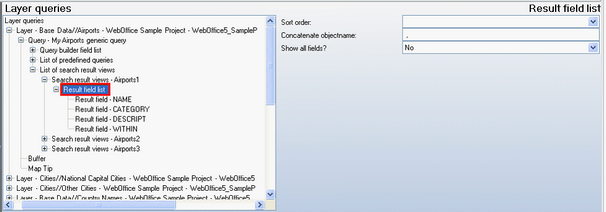
Result field list configuration
Property |
Description |
Sort order |
Specifies sort order: •Ascending or •Descending. |
Object name concatenator |
Concatenate string for generating the object name. If e.g. Fields NAME (value Graz) and CATEGORY (value Airport) are concatenated, the resulting object name will be ‘Graz, Airport’. Note: This parameter will also provide the concatenator for full-text search suggestions and full-text search multilayer results if the parameter "Separator for suggestions?" is set to "Yes" in the attribute Full-Text Search of the application configuration. In such a case the object name concatenator of the first result field list of the first search result on the respective layer of the first relevant project will be relevant. Note: Every time the configured concatenator is changed, the existing subindex is "out of date" and has to be recreated. |
Show all fields? |
If set to Yes, then all Fields of the Layer / Table get displayed, no matter whether they are explicitly configured as Result field or not. |
Result field list configuration
•Result Field
For each Result field a set of properties can be configured:
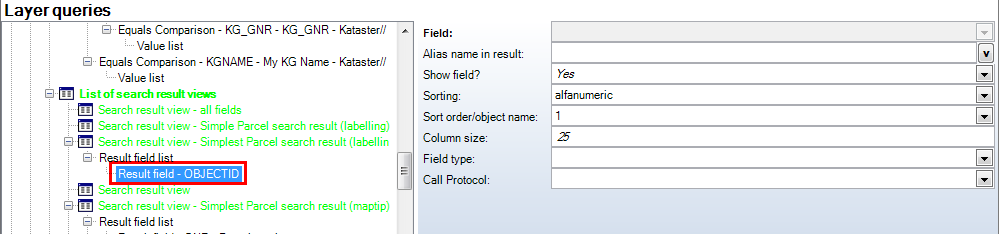
Result field configuration
Property |
Description |
Alias name in result |
Field of Layer /Table to be displayed in the Search result. |
Result page |
Alias name to be displayed. Note: It is recommended to use either Geodatabase Alias or ArcMap Alias definitions instead If possible. |
Show field? |
Display the field value in the Search result? |
Sorting |
Sorting according to database field type (fieldtype) or alphanumeric (for TEXT fields only, especially useful for house and parcel numbers and other alphanumeric values). |
Sort order/object name |
Specifies the Sort order. Use •1 for the first field, •2 for the second field •etc. None means not to use this field for sorting at all. Note: This function is used as well to create an object name for this layer by concatenating the field value with Sort order 1 to that with Sort order 2 etc. See Table Result Field List Configuration for more information on object names and concatenation delimiters. |
Column size |
Column size in Search result. Note: Being able to explicitly specify the column size in the Result page is useful for providing better layout control (especially for TEXT fields with big field sizes) |
Field type |
Provide field type information. Only used when doing search on relational database tables. Tip: Configure this attribute only if WebOffice is not able to automatically retrieve field type information from the database. |
Call Protocol |
Makes possible a call to a URL by clicking on the result cell. WebOffice formats the value, provided it is valid (if 'email' is configured, then the value must be an E-Mail Address). Note: You can choose between 'email' and 'phone'. The attribute 'email' lets the value of the result appear in form of an 'email-link', 'phone' in form of a 'phone-link'. With these links it is possible to activate either a phone call or an email directly from the search result. |
Result field configuration

Call protocol 'email' and 'phone' in the search result
•Lookup
It is possible to configure a Lookup element for each Result field.
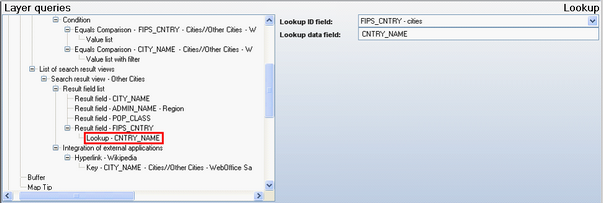
Lookup configuration for Result field
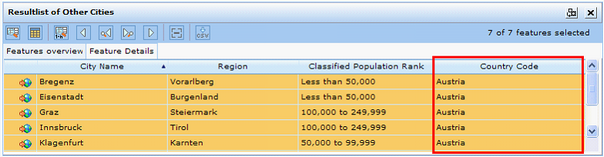
Lookup in Search result - Country name (CNTRY_NAME) is displayed instead of county code (FIPS_CNTRY) in WebOffice 10 R3 client
See paragraph ‘Lookup’ in chapter Query for more details.
See chapters Database Connection and Tables for more details on Table and Database connection configuration.