Search Results |
  
|
Search Results |
|
It is possible to configure multiple Search results. The user is able to switch between the different Search results in the WebOffice 10 R3 client on the fly.
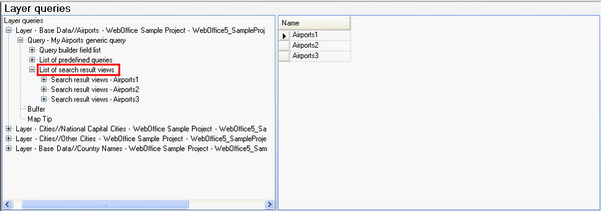
List of search result views
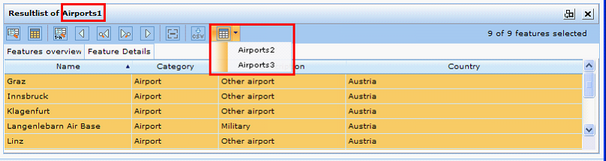
Search result drop down menu for on-the-fly switching in WebOffice 10 R3 client
A Search result specifies
•The Result field list to be displayed as well as (optional)
•1 or multiple web applications to be called (System Integration of external (web) applications)
•Neighbor Search (Creates a selection of features of a specified layer inside a specified distance, sorted ascending by distance)
•A Join (1:1) relation with another database table
•A Relate (1:n) relation with another database table
•Print templates that enable the user to immediately print from his Search result including simple reporting (attributive data of one or multiple selected objects)
•Key field to be used for SynerGIS Integrator (System integration with desktop applications called Integrator client configuration).
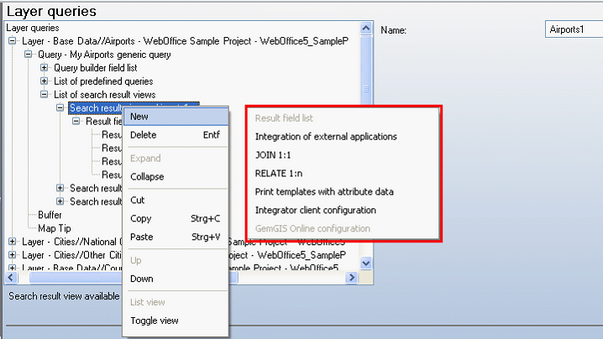
Search result view – available configuration elements
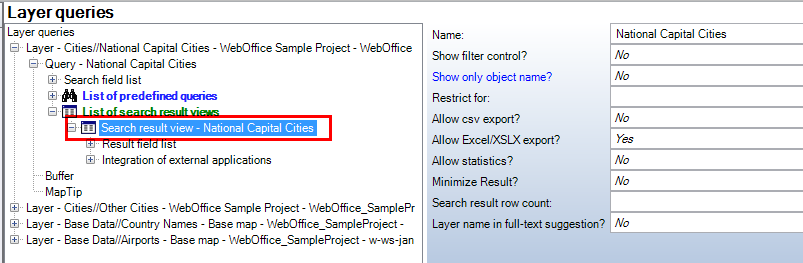
Search result view configuration
Property |
Description |
Name |
Name of the Search result displayed in WebOffice client (Search result window title). |
Show filter control? |
Specifies whether the filter control gets displayed in the search result by default or not. Using the filter control it gets very easy fort he user to filter data in the search result using attributive filter criteria. |
Show only object name? |
Specifies whether only the object name ('Yes') or each field value separately ('No') of the WebOffice flex Client gets displayed by default. |
Restrict for |
Specifies if the search result is restricted for -MapTip: Search result is available for 'MapTip' tool only -Free labeling: Search result is available for 'Free labeling' tool only |
Allow csv export? |
Defines if the user can export the query result as a csv file. |
Allow Excel/XSLX export? |
Defines if the user can export the query result as an spreadsheet file. Note: Use this option if exporting with Microsoft Excel 2007 or Microsoft Excel 2010 (both *.xlsx). If exporting with Microsoft Excel 2003 or an older version, formatting properties (e.g. comma) can be lost. Use the CSV export. |
Allow statistics? |
Defines if the result allows statistic functions for the selected features. |
Minimize Result? |
Defines if the Result List should be displayed minimized (Yes) or opened (No). |
Search result row count |
Search result row count |
Layer name in full-text suggestion |
Defines whether the layer name is to be appended in brackets to the object name when a feature of this Layer is displayed as a suggestion for the full-text search. Default: No, i.e. the layer name is not shown. |
Search result view configuration
Administrator may optionally provide a so called filter row to the search result configuration. This filter row is especially useful if users want to filter existing search result sets based on attributive filter criteria.
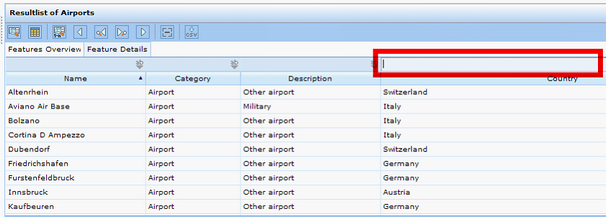
Search result with filter row - WebOffice 10 R3 client
If the user e.g. only wants to analyse Italian airports, this can easily be done by just typing ‘Italy’ into the ‘Country’ column of the Filter control.
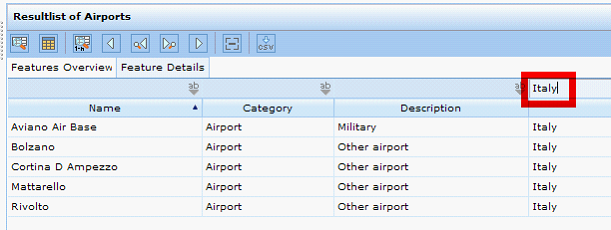
Search result with filter row ('Italy') - WebOffice 10 R3 client
Note:
If ArcMap has result fields from type 'Date', WebOffice 10 R3 reacts as follows:
- if the time to a date in ArcMap is 00:00:00, then WebOffice 10 R3 only reads the date
- if the date in ArcMap is 30.12.1899, then WebOffice 10 R3 only reads the corresponding time
- for all other cases WebOffice 10 R3 reads the time stamp (date + time)