Thematic Full-Text Search |
  
|
Thematic Full-Text Search |
|
The "thematic full-text search" in contrast to the "global full-text search" allows the configuration of a full-text search on a specific layer. This means a targeted search in only one text field for all attributes of a defined layer can be performed. Moreover the thematic full-text search has a better performance for querying than the global full-text search.
Note: A thematic full-text search index is only available for one project. So it is not possible to access the same index with another, identic project.
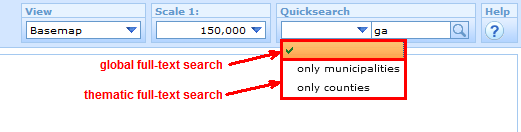
"Global" und "thematic" full-text search in the WebOffice html client
Note: "Thematic full-text search" will only work if there is a configured attribute "External Layer-ID" on the superior node "Query".
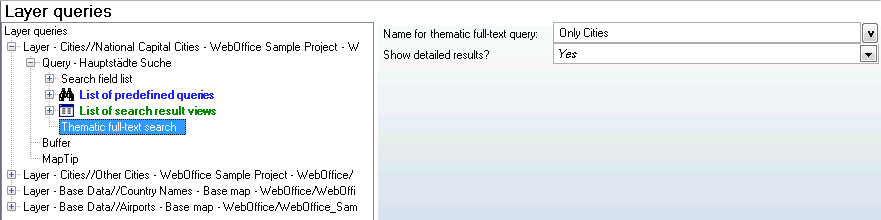
Configuration "thematic full-text search"
Property |
Description |
Name for thematic full-text query |
Localized name for thematic full-text query |
Show detailed results? |
Specifies whether the results of this thematic full-text search shall be displayed in the area "resultlist" (at the bottom of the screen - 'Yes') or in the area "result of full text search" (on the right side of the screen - 'No'). |
After configuring a thematic full-text search the subindex has to be calculated. It can be found in SynAdmin in the full-text search tab under the name of the "External Layer-ID".
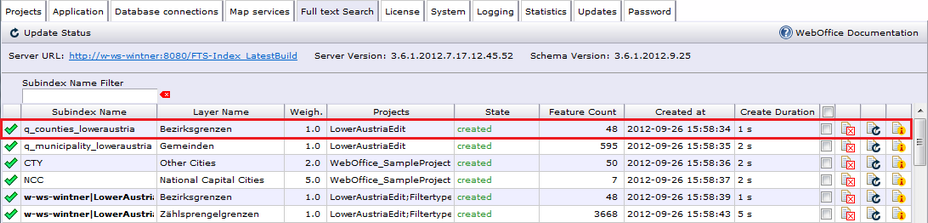
Thematic full-text search subindex
The displayed search result view for the "thematic full-text search" will be the one which is configured first in the List of Search Result Views. In case this search result view is restricted for another function (MapTip, Free Labeling, Custom Tool) the next in the list will be used. If there does not exist a search result view at all, all visible fields of the MXD will be displayed in the search result.