Open the project using WebOffice client |
  
|
Open the project using WebOffice client |
|
Finally you can open the project with WebOffice 10 R3 client to check if all your configuration changes in the map document as well as in the WebOffice 10 R3 project configuration work as expected.
For opening the project you can
•Either click on the hyperlink displayed in the WebOffice author Publish window. See figure for details. See chapter File Menu for WebOffice author Publish function documentation.
•Or click on the HTML Viewer button in the WebOffice 10 R3 administration pages. See chapter Projects Tab for details.

Open project button in WebOffice 10 R3 administration pages
•Or enter the address (URL) in a new browser session. The URL is formed like this
<WebOffice 10 R3 base URL>/synserver?project=<Project ID>
Project ID is the unique ID of the project shown in WebOffice 10 R3 administration pages:
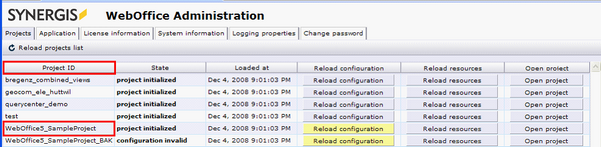
Project ID column in WebOffice 10 R3 administration pages