ArcMap toolbar for WebOffice author |
  
|
ArcMap toolbar for WebOffice author |
|
The ArcMap toolbar for WebOffice author provides five buttons.

ArcMap toolbar for SynerGIS WebOffice author
Icon |
Menu Item |
Description |
|
SynerGIS WebOffice author |
Button for launching WebOffice author. |
|
Transfer current map view from TOC |
This button retrieves structure and visibility settings from the currently active ArcMap data frame and copies it to a selected map view in the currently opened WebOffice 10 R3 project configuration. Note: See chapter Configure Map Views for details. |
|
Get table of contents |
This button retrieves structure and visibility settings from the currently active ArcMap data frame and copies it to the table of content of map collection (use entry point WebOffice --> TOC of map collection) in the currently opened WebOffice 10 R3 project configuration.
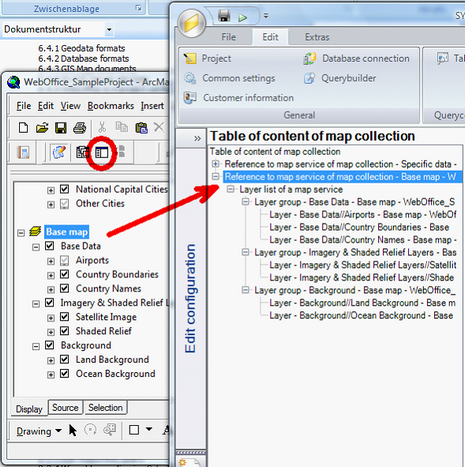 Transferring structure and visibility settings of the currently active ArcMap data frame
Note: Find more details about TOC in chapter Table of Content (TOC of Map Collection). |
|
Get Geo-bookmarks from ArcMap |
This button retrieves exisiting bookmarks of the currently active ArcMap data frame and copies them to the currently opened WebOffice 10 R3 project configuration.
 Defined ArcMap bookmarks of the currently active data frame
Note: See chapter Geo Bookmark for details. |
|
Synchronize User Management database for current project |
This button synchronizes the User Management database configured in the WebOffice author Basic settings. Use this button whenever you did change the ArcMap document structure etc.
|
ArcMap toolbar for SynerGIS WebOffice author


