WebOffice Log Explorer

The WebOffice Log Explorer displays the WebOffice log file (WebOffice.log) clearly in the browser. Entries can be filtered, searched and analyzed on a timeline; error messages including stack traces can be read completely with a single click.
The Log Explorer is available in two variants with the same interface:
•Log Explorer in %%SYNADMIN%% – shows the log file of the running WebOffice application (or of the respective node), including backups and live updates. For administrators. See Log Explorer in SynAdmin.
•Log Explorer Standalone – a web page onto which any log files can be dragged and dropped, e.g. log files sent to support or the logs of several cluster nodes. See Log Explorer Standalone.
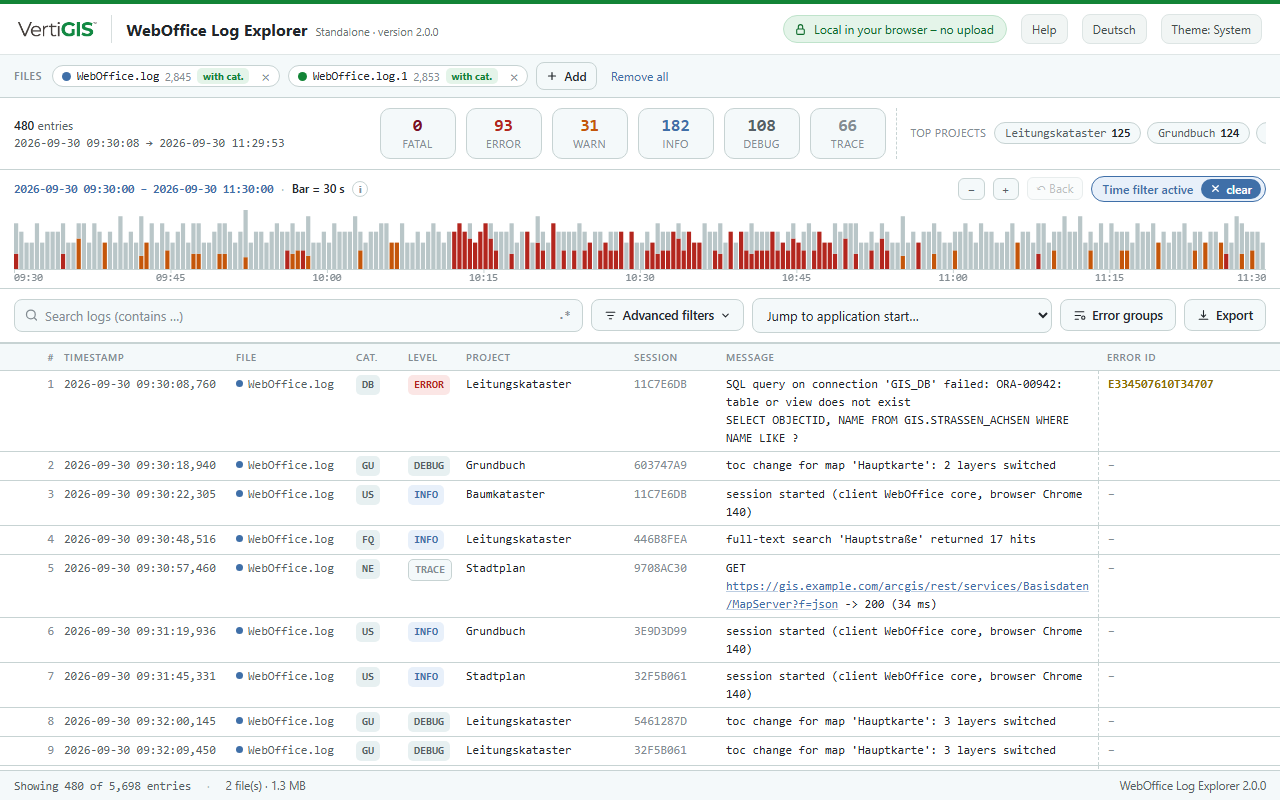
WebOffice Log Explorer
Features at a glance
•Reads the current log format with logging category as well as the previous format without logging category – also mixed
•Overview with the number of entries per log level and the most frequent projects
•Zoomable timeline with details per time slot
•Search (also with regular expressions) and filters for log level, logging category, project, session, error ID, thread and time range
•Multi-line messages and stack traces directly in the table, detail view per entry
•Error groups: the most frequent error messages at a glance
•Export of the filtered entries in the WebOffice log format
Its use is described in the chapters Analyzing Log Files and Typical Analyses; the chapter Structure of the WebOffice Log File explains the log file.
Requirements
A current browser (Microsoft Edge, Google Chrome or Mozilla Firefox). The Log Explorer does not use any additional components and does not need to be installed.
|
The Log Explorer Standalone processes the log files only locally in the browser. No data is sent to any server; closing or reloading the page removes the loaded log files. |
