Log Explorer in SynAdmin

In SynAdmin, open the Log Explorer on the Logging tab with the button Open WebOffice Log Explorer. It opens in a separate browser window and shows the log file of the WebOffice application.
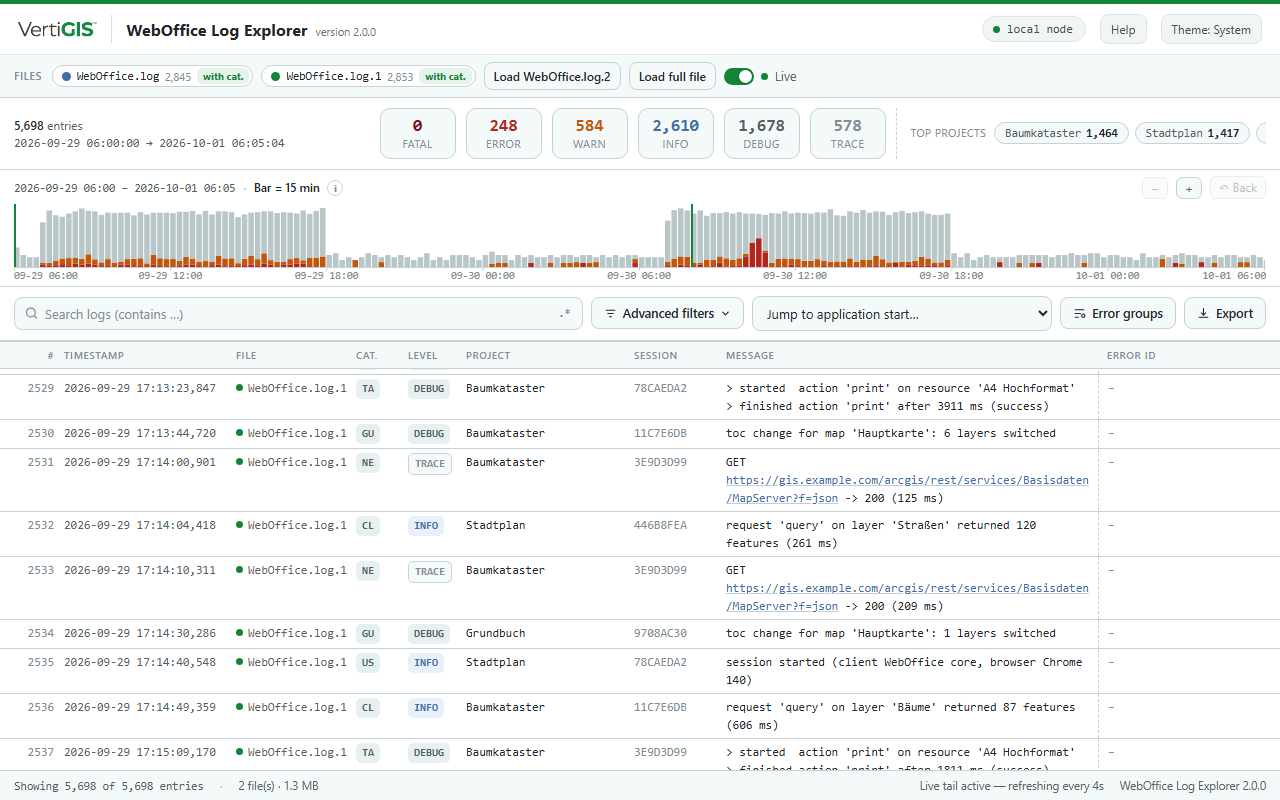
Log Explorer in SynAdmin with a loaded backup and live tail enabled
Loading the log file
•On opening, the last 1000 KB of WebOffice.log are loaded; the view is positioned at the end of the file.
•Load full file loads the entire current WebOffice.log.
•Load WebOffice.log.1 loads the most recent backup; every further click loads the next older backup up to WebOffice.log.9.
•Live loads newly written entries every 4 seconds. New entries are highlighted briefly; if the view is at the end of the list, it follows automatically.
Every loaded file appears as a file chip in the Files bar. Clicking a chip hides and shows the entries of that file. Entries that are already loaded (e.g. when loading the full file) are not shown twice.
|
The button is available if the log file is located in the directory of the WebOffice application (default). The Log Explorer uses the language of SynAdmin (German or English). |

Cluster
In a cluster, the Log Explorer only shows the log file of the node SynAdmin is currently running on; a note at the top of the page points this out, and the node is shown in the top right corner. To analyze the logs of several nodes together, use the Log Explorer Standalone.
|
How to have more details written to the log for an analysis is described in the chapter Typical Analyses. |
