Tomcat Memory Settings |
  
|
Tomcat Memory Settings |
|
Start the Tomcat configuration tool (go to the Start menu --> Programs --> Apache Tomcat --> Configure Tomcat).
i.Maximum memory pool
The most important parameters which need to be changed are
•Maximum memory pool (this specifies the maximum memory Tomcat is allowed to allocate) and
•Initial memory pool (this specifies the memory which is allocated when Tomcat starts).

Java Memory Settings for Tomcat
It is recommended to set the Initial memory pool to at least 256 MB and the Maximum memory pool to at least 2048 MB.
The maximal values for these settings, which can be set and make sense on 32bit systems depend on the used OS:
Windows: 1336 MB
Linux: 1.5 GB
ii. MaxPermSize
WebOffice 10 R3 application needs as additional JAVA option
-XX:MaxPermSize=256m
Note: The entry '-XX:MaxPermSize=256m' is case sensitive. We recommend to insert the parameters in the Java Options using copy / paste.
If the parameters in the Java options are not entered correctly, Apache Tomcat will no longer start after a reboot.
This option is needed for enabling Tomcat to load the big Arc Objects class library from Esri (1400 object classes).
Note: On a 32 Bit Windows OS (respectively for a 32 Bit Tomcat process), the sum of Maximum Memory Pool and MaxPermSize must be smaller than 1336MB.

Tomcat memory setting - MaxPermSize
After changing the Java options the Apache Tomcat must be restarted otherwise the changes will not take effect.
There are two ways to restart Apache Tomcat:
•Restart Apache Tomcat by icon in the taskbar
•Restart Apache Tomcat by Start menu and 'Configure Tomcat'
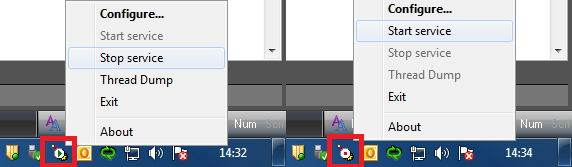
Restart Apache Tomcat by icon in the taskbar

Restart Apache Tomcat by Start menu and 'Configure Tomcat'