Creating the SynePaperService |
  
|
Creating the SynePaperService |
|
The SynePaperService is a service document that is based on the SynePaperService.mxd. Der service mxd is supplied with the WebOffice release. You can find the service mxd on the DVD under following path: WebOffice10R3SP1-DVD/SampleProject/projects/mxd/SynePaperService.mxd.
Please consider that the structure of the SynePaperService.mxd changed with the WebOffice version R3. To guarantee that all ePaper features work correct, use the new release SynePaperService.mxd!
The SynePaperService.mxd includes eight predefined empty data frames:
•ePaper
•datasources
•MapView1
•MapView2
•MapView3
•MapView4
•MapView5
•MapView6
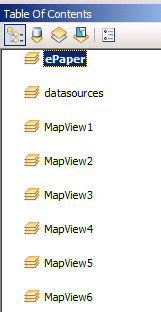
Data frames of the SynePaperService
The mxd is a dummy mxd which is filled with the desired data, dynamically. The layers that are used for the report can be from different projects and different data frames. All the layers are then loaded into one data frame.
Copy the service mxd SynePaperService.mxd into your service document folder on the GIS Server.
Publish the SynePaperService.mxd to ArcGIS Server. The name of the new new ArcGIS Server Service should be SynePaperService.
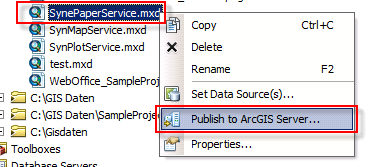
Publish to ArcGIS Server