External Call Utility |
  
|
External Call Utility |
|
SynerGIS is providing a simple test page in order to check out the possibilities to integrate a JSON map preview to other websites. The file 'testextcall.htm' can be accessed either via http://<WebOffice web application>/testextcall.htm' or via the WebOffice Administration pages and the Application Tab - External call test utility.
(For further information see chapter Service API).
The test page is divided into four different areas:
•Sample Requests
•Supported parameters
•Simple form to generate requests (Generated request form)
•Request and Responses
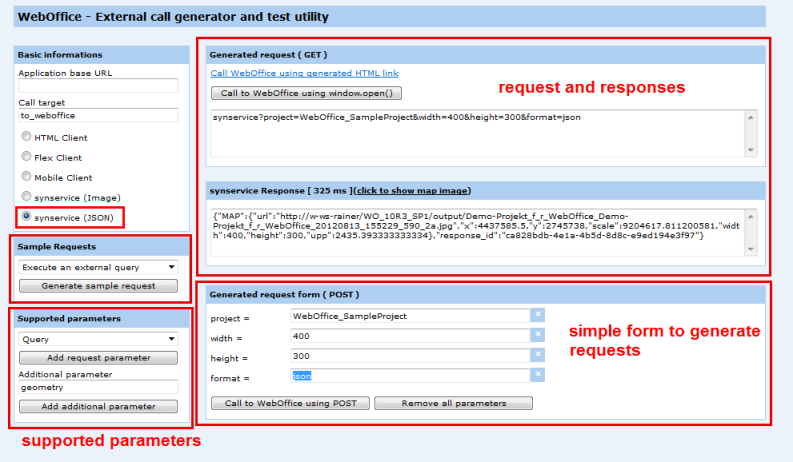
Test page - testextcall.htm
Following examples demonstrate how to create requests and are based on WebOffice_SampleProject.
Example A: To do a external query
Best practice:
1.Choose the sample request "Query/filter combination"
2.Adapt the certain parameters to the certain project (project, format, query, keyname, keeyvalue, ...)
3.Click the button "Call to WebOffice using POST" to execute the request.
4.To get a map image click "Click to show map image".
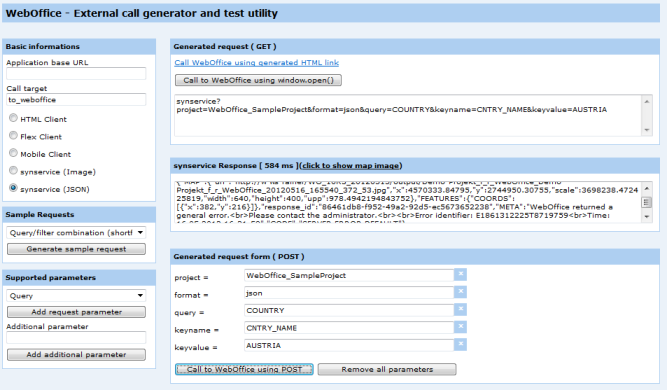
Configure a query
The complete request for example A:
synservice?project=WebOffice_SampleProject&format=json&query=COUNTRY&keyname=CNTRY_NAME&keyvalue=AUSTRIA
The response would look like this:
{"MAP":{"url":"http://w-ws-rainer/WO_10R3_20120515/output/Demo-Projekt_f_r_WebOffice_Demo-Projekt_f_r_WebOffice_20120516_165540_372_53.jpg",
"x":4570333.84795,"y":2744950.30755,"scale":3698238.472425819,"width":640,"height":400,"upp":978.4942194843752},"FEATURES":{"COORDS":[{"x":382,"y":216}]},
"response_id":"86461db8-f952-49a2-92d5-ec5673652238"}
This response contains following parameters:
•URL of the generated map image
•X and Y- coordinates of the center point of the map image
•scale of the map image
•width and hight of the map image
Example B: external query with parameters "returnkey" and "geometry"
The parameters "&returnkey" and "&geometry" are supported, but have to be defined manually ('Additional parameters').
I. "&returnkey"
The request containing the parameter 'returnkey' could look like this:
query=COUNTRY&keyname=CNTRY_NAME&keyvalue=Austria&returnkey=LONG_NAME
The response would look like this:
{"MAP":{"url":"http://w-ws-rainer/WO_10R3_20120515/output/Demo-Projekt_f_r_WebOffice_Demo-Projekt_f_r_WebOffice_20120515_172844_806_8c.jpg",
"x":4570333.84795,"y":2744950.30755,"scale":3698238.472425819,"width":640,"height":400,"upp":978.4942194843752},"FEATURES":{"keyname":["CNTRY_NAME"],
"COORDS":[{"x":382,"y":216,"keyvalue":["Austria"]}]},"response_id":"f4b7408b-85d9-478f-b227-3aeee6929ff2"}
II. "&geometry"
If you don't want to generate a Query or Selection attributive, you can do this by certain coordinates. Therefore use the parameter geometry=(geometry) in the area of 'query' instead of the parameters keyvalue keyname.
The response would look like this:
{"MAP":{"url":"http://w-ws-rainer/WO_10R3_20120515/output/Demo-Projekt_f_r_WebOffice_Demo-Projekt_f_r_WebOffice_20120515_174159_228_ac.jpg","x":4820637.819250001,
"y":2807579.80765,"scale":1256055.7877890104,"width":200,"height":200,"upp":332.33209185000516},"FEATURES":{"keyname":["CITY_NAME"],"COORDS":[{"x":191,"y":100,"keyvalue":["Bratislava"]},
{"x":9,"y":100,"keyvalue":["Vienna"]}]},"response_id":"ac4cb877-f7fd-4380-84d9-f0b2571a8af7"}
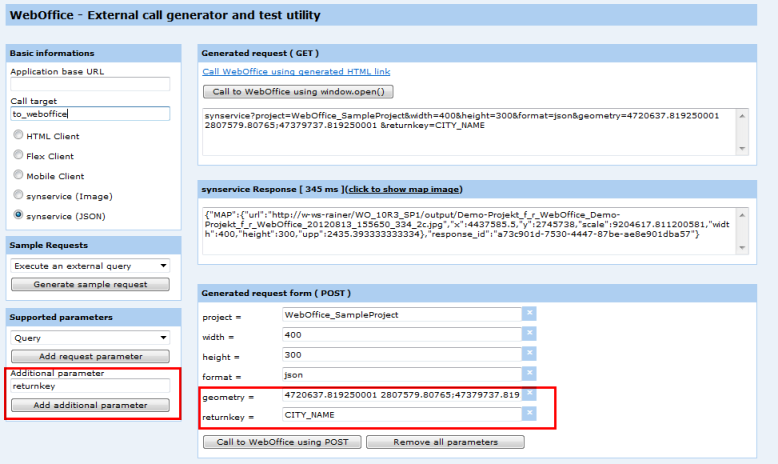
Parameters "&returnkey" and "&geometry"
Example C: Display metainformation
The implementation of the parameter metainfo=true makes it possible to get metainformation of tool in the response. (This parameter has to be defined manually via 'Additional parameters'.)
Note: At the moment this parameter can only return metainformation of the Geolocation-Tool, that has to be configured in the WebOffice 10 R3 project. If the tool is not implemented in the project, no metainfos can be returned.
The request containing the parameter 'metainfo=true' could look like this
synservice?project=WebOffice_SampleProject&width=400&height=300&format=json&metainfo=true
The response would look like this:
{"MAP":{"url":"http://w-ws-rainer/WO_10R3_SP1_latestBuild/output/Demo-Projekt_f_r_WebOffice_Demo-Projekt_f_r_WebOffice_20120830_120351_742_5a.jpg","x":4437585.5,"y":2745738,"scale":9204617.811200581,"width":400,"height":300,"upp":2435.393333333334},"METAINFO":{"tool_geolocation__init_scale":"1000"},"response_id":"ae0d2f2b-b491-4f0b-b52a-4670081a27bc"}