Export data for support request |
  
|
Export data for support request |
|
In WebOffice author standalone there is the possibility to export a file in which some data about the WebOffice 10.8 SP2 project is automatically compiled. In addition, this function offers the possibility to make some settings for the file that is to be exported.
The following information can be covered by the support file:
▪Mantis-ID or title (manual)
▪Version number
▪Operating system information
▪Log files
▪Settings
▪Saved application configuration (+ schema)
▪Configuration schema
▪The current project which is opened in the WebOffice author standalone
▪User Management
▪ArcMap Project (.mxd) / ArcGIS Pro Project (.aprx)
▪ArcMap Map Package (.mpk) / ArcGIS Pro Project Package (.ppkx)
▪URLs (e.g. to a Map Package (ArcMap, .mpk) or a Project Package (ArcGIS Pro, .ppkx) shared on a Portal or web server)
▪Description
▪Additional Information
▪Screenshot or file
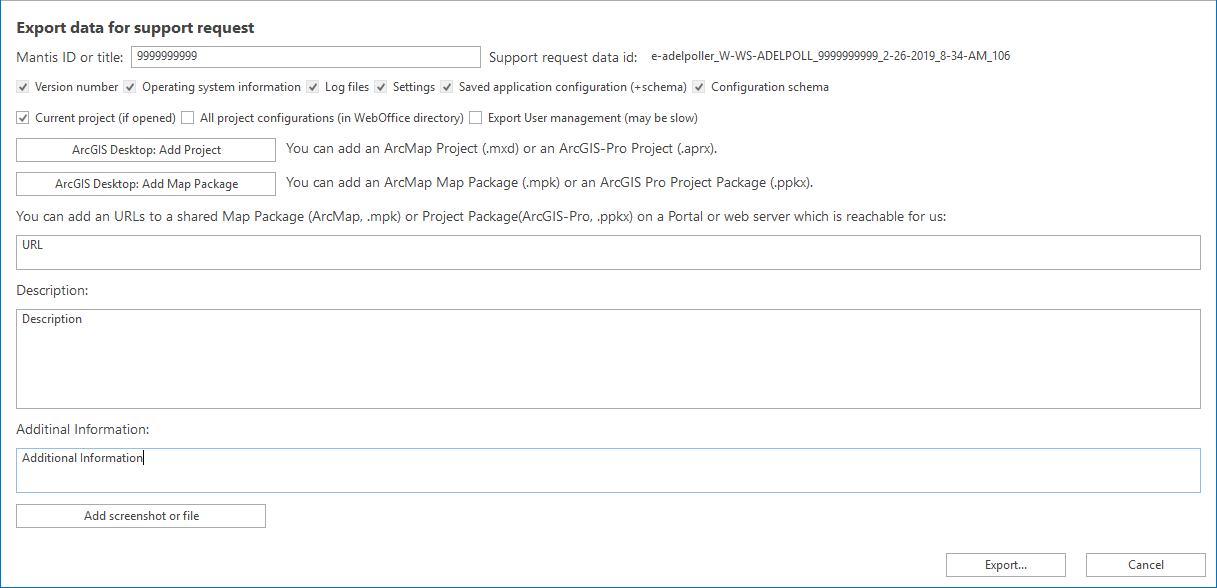
Export data for support request
The function can be finished by clicking on the Button Export... . This generates a .zip file which can be forwarded to the support (https://resources.weboffice.vertigis.com/Documentation/WebOffice/contact.html).
Note: For further information on how to make a proper support request please visit the chapter Request WebOffice Support