Troubles with SOE registration |
  
|
Troubles with SOE registration |
|
If you get troubles when installing the ArcGIS for Server Object Extension for WebOffice (SOE) please try the following workaround:
•Call the ArcGIS 10.4 for Server Administrator Directory http://<server name>[:<port>]/arcgis//admin and log in with your primary site administrator name and password.
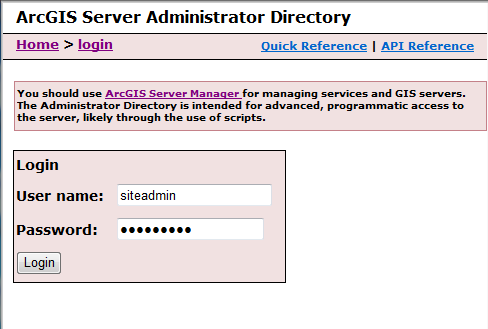
ArcGIS 10.4 for Server Administrator Directory
•Copy the ID of the uploaded syn_soe_ao_gateway.soe by navigating to uploads.

Copy the ID of the SOE
•If the uploaded item does not exist, upload the syn_soe_ao_gateway.soe by using the upload option. After having uploaded succesfully the SOE copy the generated ID.
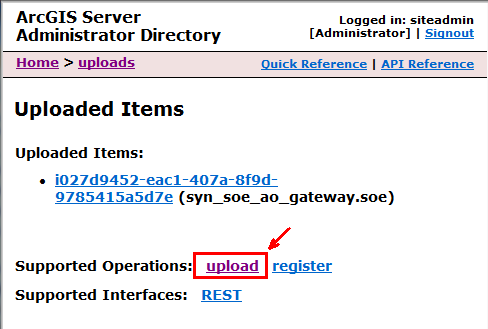
Upload the SOE
•Register the SOE by navigating to services/types/extensions/register. Paste the ID of the SOE into the empty field and register the SOE with the Register button.
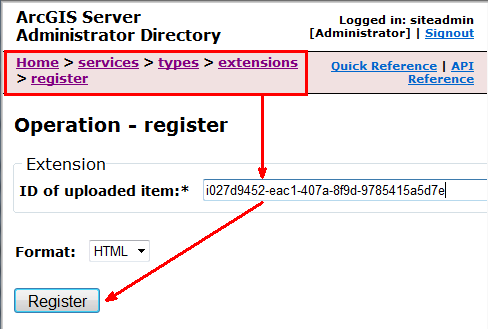
Register the SOE
•Check a successful registration of the SOE by navigating to services/types/extensions.
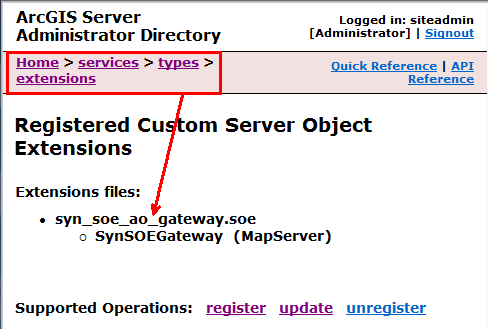
Check succesfull registration