Map Content |
  
|
Map Content |
|
Within this section it is possible to specify general settings about the map content such as:
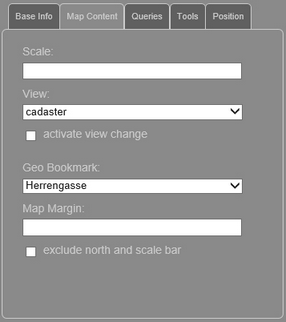
WebOffice map widget testcontainer - map content
Input parameter |
Description |
Insert the desired scale of the map content. |
|
Select the desired map view (use the external ID of the map view in the project configuration) |
|
Activates the tool for changing the map view directly in the WebOffice map widget. Note: The tool shows the external ID of the map view in the drop down list. |
|
Select the geo bookmark, that defines the spatial extent for calling the project (the external ID has to be configured in the project). |
|
Defines the number of tiles to get preloaded in the area outside the currently visible map (default is 1.0, note that a change of the value is only useful when using cached services). |
|
By using this option the north arrow, scale bar and copyright information will be suppressed. |
Input parameter - Map Content WebOffice map widget Testcontainer