Base Info |
  
|
Base Info |
|
Within this section it's possible to specify the connection to the used WebOffice project.
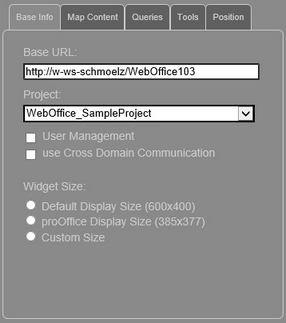
WebOffice map widget testcontainer - base info
Input parameter |
Description |
||||||
Base URL |
Specifies the WebOffice 10.3 SP2 application (e.g. http://<server>:<port>/<WebOffice-Applikation>). Automatically this field will be filled with the Base URL where the testcontainer is launched. Of course this Base URL can be adjusted anytime. Note: When checking the option 'use Cross Domain Communication' the content of Base URL and Project will be cleared. |
||||||
Project |
Specifies the project name (Name of the project configuration -XML). Note: When checking the option 'use Cross Domain Communication' the content of Base URL and Project will be cleared. |
||||||
User Management |
When using WebOffice usermanagement, it is possible to enter User and Password. Note: Please check the supported types of authentication in Important Information. |
||||||
use Cross Domain Communication |
Cross domain scripting is supported with WebOffice map widget. Note: Cross domain scripting will be necessary in cases where WebOffice map widget is hosted in other applications (consequently in other domains) than it is implemented. |
||||||
Widget Size |
The size of the WebOffice map widget can be adjusted in the WebOffice map widget testcontainer, three options are available:
|
WebOffice map widget testcontainer - base info
Note: Please find more details about user and password with WebOffice map widget in Administration Parameters.
Note: Please find more details about cross domain scripting with WebOffice map widget in Cross Domain Scripting.