Update Configuration of Tomcat ISAPI Redirector |
  
|
Update Configuration of Tomcat ISAPI Redirector |
|
In case you work with IIS/Tomcat/ISAPI Redirector you should make IIS aware of the WebOffice 10 R3 web application installed within Tomcat (this way you will be able to use standard Port 80 URLs to call WebOffice 10 R3 projects in the browser. If you do not want to make use of the Tomcat ISAPI Redirector then users will need to provide the Tomcat port in the browser URL. The Tomcat port by default is 8080 but may be changed throughout the installation process of Apache Tomcat). Do this by adding some configuration entries into the file “uriworkermap.properties”.
•Open the file “uriworkermap.properties”, which can be found in the directory <Tomcat install dir>\conf

Configuring Tomcat ISAPI Redirector for WebOffice 10 R3
•Insert the following lines and save the file:
#SynerGIS WebOffice
/WebOffice/*=wlb
/WebOffice=wlb
•Restart IIS Admin and WWW Publishing services
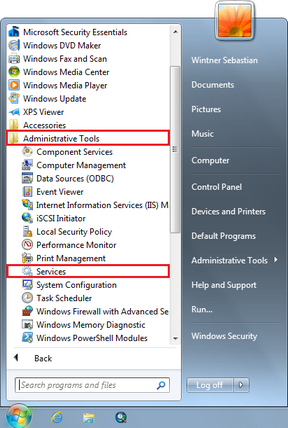
Starting Windows Services management
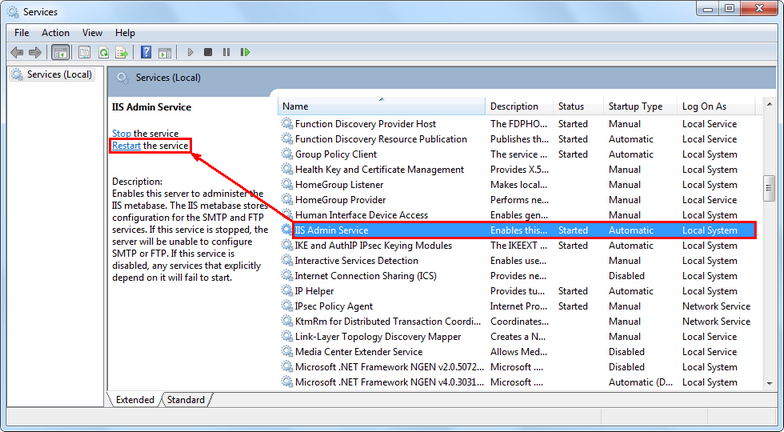
Restart IIS Admin and dependent services
•And Restart the Apache Tomcat service:
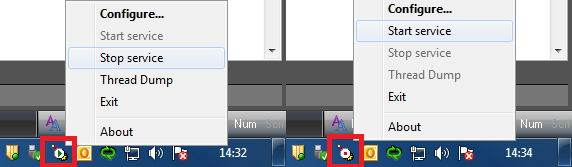
Restart Tomcat service