Filter |
  
|
Filter |
|
Use the Filter function for enabling users to dynamically filter specific objects of one or several layers: Dynamic filtering of data by using filter conditions respectively by using different combinations of domain values when using an Esri domain for the specific data field (e.g.: show me in layer 'water lines' only lines of type 'sewer' and 'fresh water').
Note: The Filter function only works for layers of dynamic map services. Layers from cached map services cannot be filtered, because they are already calculated for the tiles. The Filter function neither works for the hybrid mode scenario (linking MXD and MSD service together).
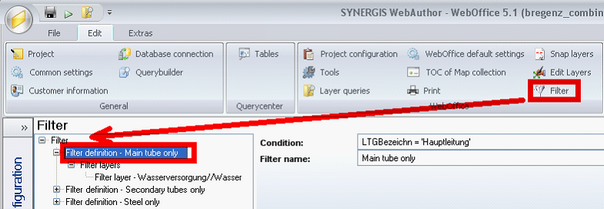
Filter configuration
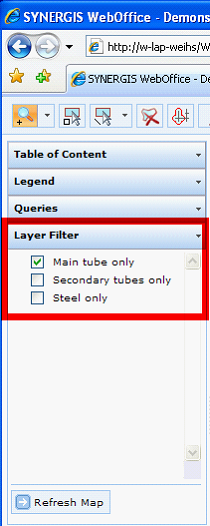
Layer filter control in WebOffice 10 R3 client
Note: It is possible to specify multiple Filter definitions. These Filter definitions can be logically combined by the user using the WebOffice 10 R3 client. Filter definitions get combined using the logical OR-operator.
Note: When using the full-text search together with filters, be sure to recreate the subindex corresponding to the defined filter. The relevant subindex will be marked "out of date" in SynAdmin. Please, see chapter How to configure a Full-Text Search for information about how to recreate a subindex.
Using the logical OR-operator was a new feature of WebOffice 6 Update 1. If you want to update an older WebOffice project (WebOffice 6.0 or earlier) with filter definitions to WebOffice 10 R3, the behavior of the filter definitions will change! Revise your filter definition if needed!
Note: If you specify a Filter definition on a layer field that has a related Esri domain, then all available domain values will get listed. The user may select one or multiple domain values in the WebOffice 10 R3 client. Combinations of domain values of one layer field get combined using the logical OR-operator.
Note: If WebOffice UserManagement is configured, configured attribute filters will be combined with one or multiple Filter definitions using the logical AND-operator.
Property |
Description |
Update map automatically? |
Specifies if the map gets updated automatically whenever the state of filters is changed (Yes) or if a button to refresh the map is provided (No). |
Timeout |
Specifies the time (ms), after which the map is updated automatically. |
Filter configuration - WebOffice Category