Recommendation for a single server scenario |
  
|
Recommendation for a single server scenario |
|
In a single server scenario, ArcGIS Server and Tomcat are running on the same machine. Because ArcGIS Server 9.3.1 does not support 64bit technology, the application pool of the Internet Information server containing the ArcGIS Server websites and the default website will run in 32bit mode. For using the ISAPI Redirector or other web applications in 64bit mode, a second application pool has to be configured:
Open the Internet Information Server Manager. Navigate to Application Pools and add a new Application Pool named AppPool_64bit.
Note: These steps are not necessary if you are working with ArcGIS Server 10. ArcGIS Server 10 creates own application pools for the ArcGIS Server Applications by default.
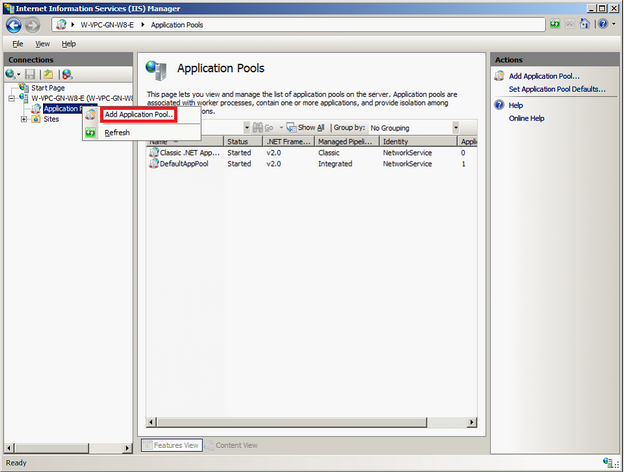
IIS Manager - Add Application Pool
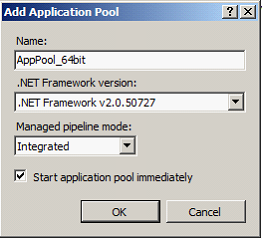
Application Pool configuration in IIS Manager
Select the DefaultAppPool and go to View Applications.
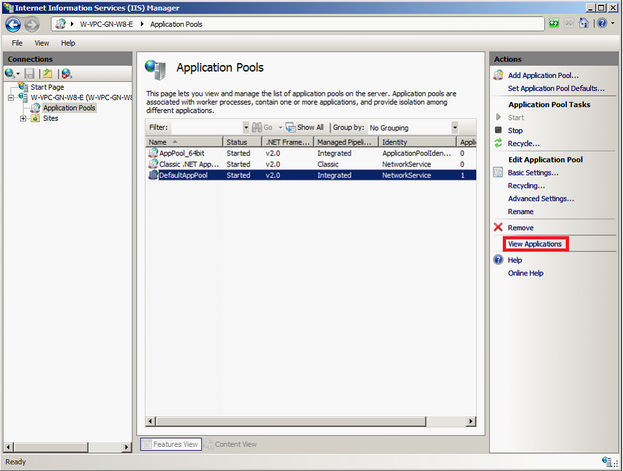
Applications running in a specified Application Pool
Select the Root Application (Default Web Site) and go to Change Application Pool and select AppPool_64bit.
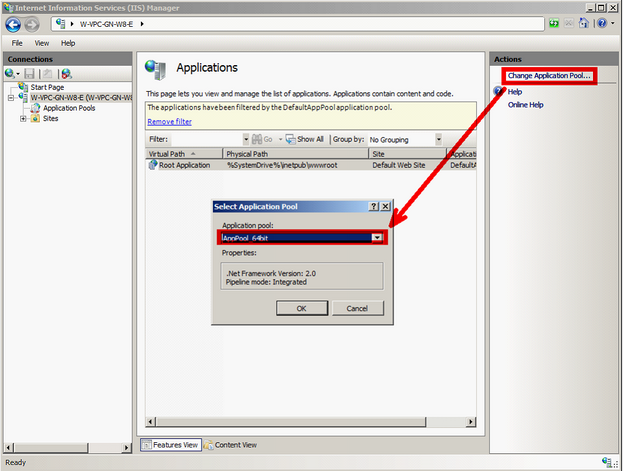
Assign application to new Application pool
If further applications (non ArcGIS Server) are running in DefaultAppPool you can assign them to AppPool_64bit too.
Be sure, that the Advanced Setting: Activate 32 Bit Applications is set to true on the DefaultAppPool and set to false on the AppPool_64bit.