Gather information needed for requesting a WebOffice 10 R3 License |
  
|
Gather information needed for requesting a WebOffice 10 R3 License |
|
For requesting a WebOffice 10 R3 license you first need to determine the primary MAC address of the WebOffice 10 R3 Application server machine.
The easiest way to get the MAC address is to start the WebOffice 10 R3 administration pages by entering the URL in the browser:
http://<servername>:<port>/WebOffice/synadmin
Standard Password is admin

Reading the MAC address
Alternatively it is possible to open the command line ("Run…") and enter:
1)cmd
2)ipconfig /all
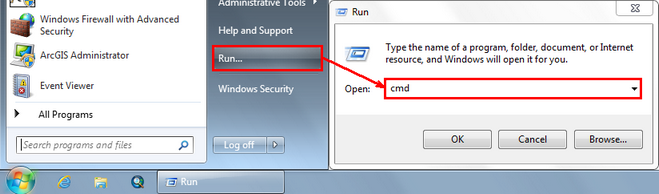
Open command line DOS box
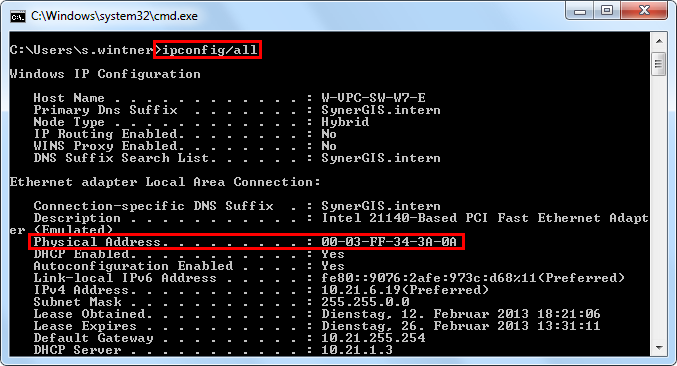
Using command ipconfig /all
In a second step you need to check whether you have an ArcGIS Server Workgroup or ArcGIS Server Enterprise installed. You need to provide this information to SynerGIS when requesting the WebOffice 10 R3 license.
With the MAC address of your web-application server you are ready to request a license file from SynerGIS.