Web CODI - Delete All Objects

Button to delete all Web CODI objects.
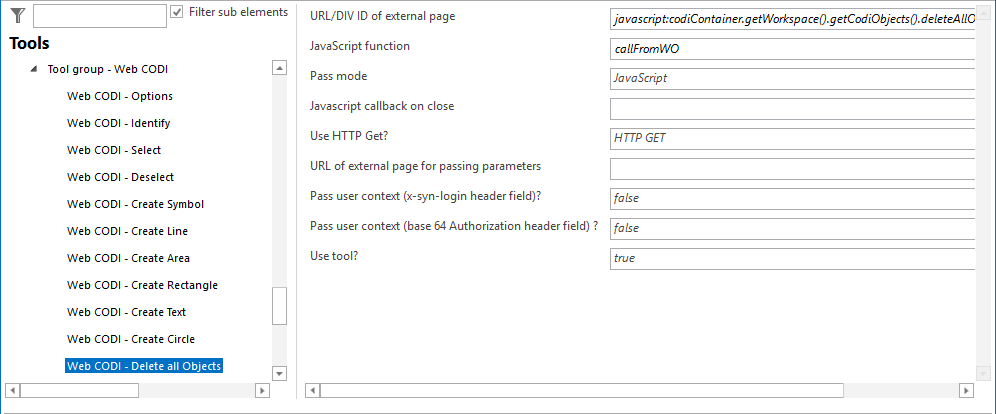
Configuration - Web CODI Delete all Objects
Property |
Description |
||||
|---|---|---|---|---|---|
URL/DIV ID of external page |
Full URL of external web page/application. If a value starting with javascript: is configured, an ID of a HTML DIV element can be used instead of an endpoint URL. Contents of the page will be provided by a DIV container instead of an IFrame. For example, use javascript:myDiv for being able to use a Custom Tool that you can access programmatically (JavaScript) using the HTML DIV with ID=myDIV. |
||||
JavaScript function |
JavaScript function of external web page/application called by WebOffice 10.9 R5. e.g. ProcessWebOfficeCall(objKeys[],geom[][]). |
||||
Pass mode |
Pass mode •HTTP: Pass coordinates and/or object keys from WebOffice 10.9 R5 to the external web page via HTTP (parameters are added in the query string of the HTTP request)
•JavaScript: Pass coordinates and/or object keys from WebOffice 10.9 R5 to the external web page calling a JavaScript function of the configured web page
|
||||
JavaScript callback on close |
JavaScript method called before closing the tool |
||||
Use HTTP Get? |
Pass parameters to external application via HTTP Get (or HTTP Post).
|
||||
URL of external page for passing parameters |
Full URL of external web page/application used for passing parameters (Pass mode HTTP). |
||||
Pass user context (x-syn-login header field)? |
Specifies if the user context of the user logged on to WebOffice 10.9 R5 will get passed in the HTTP header. |
||||
Pass user context (base 64 Authorization header field)? |
Specifies if the user context of the user logged on to WebOffice 10.9 R5 will get passed in the HTTP header Authorization, using base64 encoding, basic authentication. It is only passed if the requested address is the configured address itself or below it (same scheme, host and port, same path or below). The query part of the configured address is not compared. |
||||
Specifies, in which clients the custom tool should be used (All clients, desktop and flex clients, desktop clients only, flex clients only or mobile clients only)
|
|||||
Use tool? |
Specifies whether this tool is available in the WebOffice 10.9 R5 clients (true) or not (false). |

Properties - Web CODI Delete all Objects