WMS Service

Configure the WMS Service tool to give users the option to add WMS services into the WebOffice 10.9 R5 project. Either configure only the tool, so the user can enter the URL himself or predefine a list of WMS services to be chosen from. Currently, versions 1.1.0, 1.1.1 and 1.3.0 of OGC WMS implementation are supported.
|
By default the parameters inspire, layer_id, login, map, name, ogc_ticket, pw, service_name are allowed in the URL, any other parameters will be ignored. Although the list of parameters can be expanded in OGC Parameter Whitelist. |


Add WMS service tool configuration
Property |
Description |
||
|---|---|---|---|
Use OGC CSW service? |
Specify whether to use OGC CSW service (true) or not (false). If Yes then keyword search on OGC CSW 2.0 conform catalog service is possible. |
||
CSW SOAP URL |
Resolution (in DPI) for Export in high resolution. The value is usually a multiple of 96 (192 or 288). The low resolution export works with the resolution of the screen (96 DPI). An export with less than 96 DPI is not allowed. |
||
CSW SOAP action |
CSW SOAP action
|
||
Allowed servers for entered services |
Servers (host names) the user may add WMS services from by entering a URL. Empty (default): every URL is allowed. See section Allowed servers for entered services below. |
||
Use tool? |
Specify whether this Tool is available in the WebOffice 10.9 R5 clients (true) or not (false). |
Add WMS service tool properties
Allowed servers for entered services
The property Allowed servers for entered services defines the servers from which users may add WMS services by entering a URL.
•Separate multiple entries by comma, semicolon or space.
•An entry is a host name (e.g. lfu.bayern.de) or a domain with a wildcard (e.g. *.bayern.de for all servers below bayern.de, but not bayern.de itself).
•Specify the server name only, without scheme (https://), port and path. Internal servers can be listed as well.
If the property is empty (default), every URL is allowed, as before. If it is set, services from other servers are refused: the user gets a message, and a warning with the server name is written to the log file. The check applies to:
•URLs entered in the tool,
•the start parameter service_url (see WebOffice URL call interface),
•results of the CSW search,
•saved map states,
•redirects and all further requests to the service (e.g. addresses from the capabilities).
The services from the predefined List of WMS Services are always allowed.
|
Recommendation: In projects where users may add WMS services freely, list the servers needed. Afterwards, test in particular the target servers of the CSW search, WMS services whose capabilities refer to further servers, and saved map states. |
If you want to provide a list of predefined WMS services the user can choose from, configure the List of WMS Services element that can contain one or multiple WMS services.
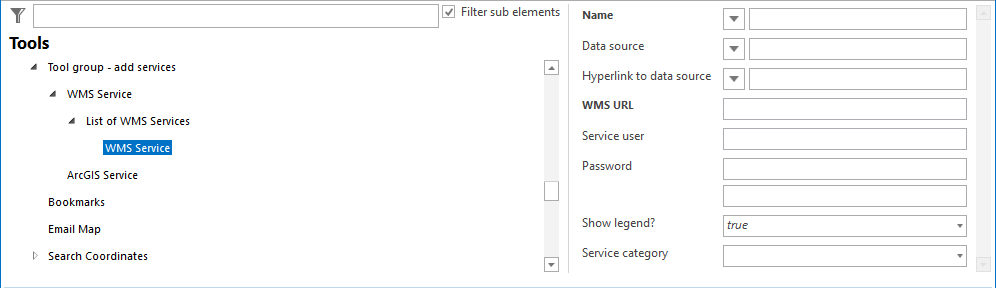
WMS service configuration
Property |
Description |
||
|---|---|---|---|
Name |
WMS service name. |
||
Data source |
Data source information. |
||
Hyperlink to data source |
Hyperlink to data source. |
||
WMS URL |
WMS URL (get capabilities request). |
||
Service user |
User name of User accessing OGC WMS service.
|
||
Password |
Password. |
||
Show legend? |
Specifies if it's possible to display the legend of the service via context menu in the Table of Contents (TOC), if the service provides a legend information. |
||
Service category |
Determines the Group category for WMS services displayed for the tool Add WMS Service. |
WMS service properties
|
•See chapter Add WMS Service for details about adding WMS services in the WebOffice core client. •See chapter OGC Map Service for details about the configuration of OGC map services. |
