List of Data Share Directories

In some scenarios (especially WebOffice plot extension and WebOffice ePaper) there may occur memory heaps if the Server Object Extension has to process too much data. In order to avoid these peaks, a data share directory has to be configured.
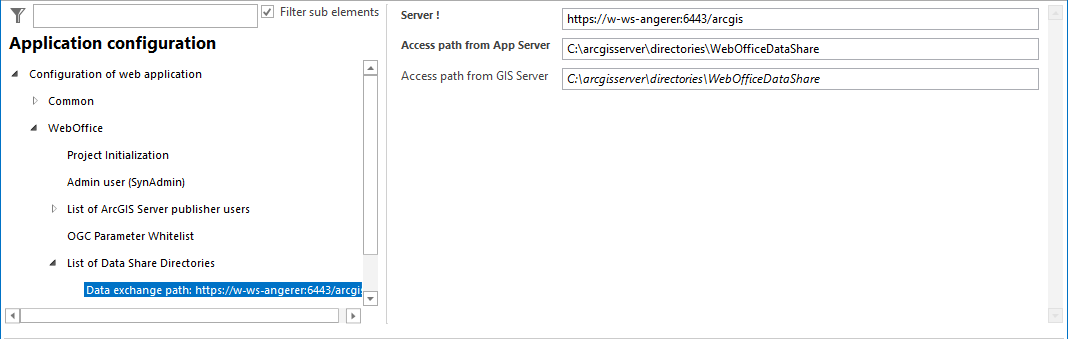
 

List of data share directories configuration

List of data share directories configuration


Property

Description

Server

Host name of the ArcGIS Server.

e.g. http://<server name>:6080/arcgis

Access path from  App Sever

Access path from Application Server.

Specifies the path for accessing the datashare directory from the WebOffice 10.9 R5 application server. Define a local server drive for Single Server installation scenario or an UNC path for distributed installation scenario.

icon_comment

•It is recommended to create the datashare directory on the GIS Server (e.g. C:\arcgisserver\directories)

•The directory must have the name WebOfficeDataShare, otherwise no Directory Cleanup will be performed (see: Cleanup of Directories)

•The same directory, that is configured Access path from GIS Server, must be referenced!

•The Windows user account(s) used for running ArcGIS Server and Apache Tomcat must have read and write rights on this directory.

•If WebOffice 10.9 R5 application server and ArcGIS Server reside on same machine, you can specify the same path like for Access path from GIS Server attribute.

Access path from GIS Server

Access path from GIS Server.

Specifies the path for accessing the datashare directory from the GIS Server. Define a local server drive for Single Server installation scenario or an UNC path for distributed installation scenario.

icon_comment

•It is recommended to create the datashare directory on the GIS Server (e.g. C:\arcgisserver\directories)

•The directory must have the name WebOfficeDataShare, otherwise no Directory Cleanup will be performed (see: Cleanup of Directories). In addition, for security reasons the SynOutputService only reads files from the directory if the access path from the GIS Server is a UNC path, is located below the ArcGIS Server folder directories (e.g. C:\arcgisserver\directories\WebOfficeDataShare) or points to a folder named WebOfficeDataShare. This also applies to mapped drives.

•If the directory is redirected on the ArcGIS Server by a symbolic link (mklink /d) or a junction, the link target must also be named WebOfficeDataShare. Alternatively, enter the UNC path directly as Access path from GIS Server. The links of the cluster concept (Tomcat folders output and WEB-INF\work) are not affected.

•The SynOutputService only reads the file types that WebOffice 10.9 R5 places in the data share directory: images (PNG, JPG, GIF, TIF, BMP), ZIP archives and layer files (.lyr).

•If the SynOutputService does not read a file for these reasons, e.g. printing with raster data, upload, thematic maps and the GeoTIFF extract do not work. The ArcGIS Server log of the SOE then contains the warning data path rejected.

•Recommendation: restrict outgoing SMB connections (port 445) of the ArcGIS Server machine by firewall to the file servers that are actually needed, e.g. the server hosting the data share directory.

•The same directory, that is configured Access path from App Server, must be referenced!

•The Windows user account(s) used for running ArcGIS Server and Apache Tomcat must have read and write rights on this directory.

•If WebOffice 10.9 R5 application server and ArcGIS Server reside on same machine, you can specify the same path like for Access path from App Server attribute.

Data exchange path properties


icon_comment

Be aware that a lot of files can be saved in the data exchange path directory. VertiGIS recommends therefore to empty the directory regularly

•either by using the cleanup functionality (List of Data Shares) in the WebOffice 10.9 R5 application configuration

•or by using an automatic batch script.