Application with Static Hyperlink

Configures an application with a static link which can be integrated in WebOffice 10.9 R5. It can be used for a link to a website related with the query topic, to execute a query with external call to WebOffice 10.9 R5 or to zoom to a specific location in the map.
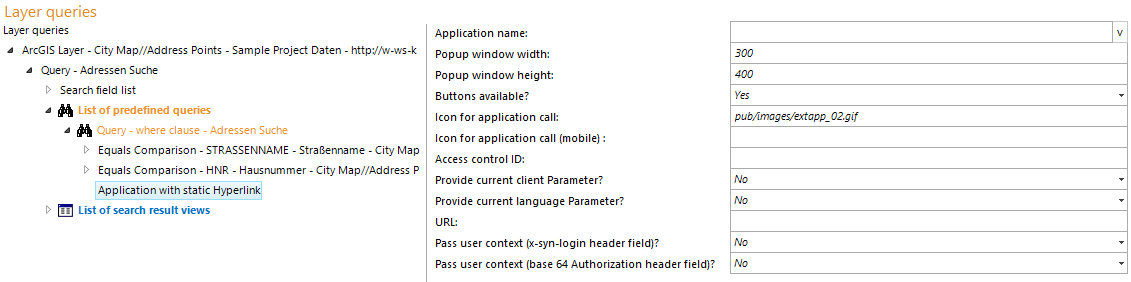
Application with static hyperlink configuration
Property |
Description |
Application name |
Name of external web application used for display in WebOffice 10.9 R5 client (search result). |
Popup window width |
If using popup windows for displaying external contents the size of the popup window can be configured. |
Popup window height |
If using popup windows for displaying external contents the size of the popup window can be configured. |
Buttons available? |
Property is not available for static hyperlinks. |
Icon for application call |
In WebOffice 10.9 R5 folder pub/images 10 icons are available (extapp_01.gif, extapp_02.gif to extapp_10.gif). Icon size 16x16 pixels. |
Icon for application call (mobile) |
In WebOffice 10.9 R5 folder pub/images/mobile 10 sample icons are available (extapp_01.png to extapp_10.png). |
URL |
Full URL pointing to the site to display |
Provide user context (x-syn-login header field)? |
Used for WebOffice usermanagement secured projects. Specifies if the user context of the user logged on to WebOffice 10.9 R5 will get passed in the HTTP header. Note: If providing a user context to an external application the URL will be redirected. All paths used in the external Application have to be absolute! |
Pass user context (base 64 Authorization header field)? |
Specifies if the user context of the user logged on to WebOffice will get passed in the HTTP header Authorization, using base64 encoding, basic authentication. It is only passed if the requested address is the configured address itself or below it (same scheme, host and port, same path or below). The query part of the configured address is not compared. |
Application with static hyperlink properties
by configuring a subelement you can define the display mode:
•Display mode iFrame
•Display mode Pop up