ArcGIS Web Scene

|
•As of WebOffice 10.9 R6 the web scenes and tools are configured in the project configuration (WebOffice Author, Map Elements, node 3D WebScenes), no longer in the file ArcGIS_WebScene.htm. For details see 3D WebScenes. •As of 10.9 R6 the standard tool 3D web scenes is available for this. The following steps 1 to 3 only apply to versions up to 10.9 R5. •Existing custom tools keep working. Own copies of the file ArcGIS_WebScene.htm should be replaced by the standard tool, as they are not developed further (e.g. secured web scenes, detection of layers, messages). |

This Custom Tool allows users to display Web Scenes that are particularly useful to make 3D data available for visualization and analysis purposes.
|
More information on this topic can be found in the ArcGIS online help in the section Web scenes. |

|
•The portal of the active web scene is always used. •Up to WebOffice 10.9 R5 the custom tool “ArcGIS Web Scene” only supports public web scenes. As of 10.9 R6 secured web scenes are loaded with the login of the user to the portal too, see 3D WebScenes. |

See also the following video on this topic:

WebOffice: Integrating 3D ArcGIS WebScenes
Configure the custom tool ArcGIS_WebScene.htm from the directory C:\Tomcat\webapps\<WebOffice application>\pub\custom_tools as described:
(1) Web-Integration - custom Tool
Configure a Web integration - custom tool with the following parameters:
URL of external page: pub/custom_pages/forward_splitscreen.jsp?to=pub/custom_tools/ArcGIS_WebScene.htm
JavaScript function: callFromWO
Tool icon: pub/images/esri_WebScene.png
|
In WebOffice versions prior to 10.9, the URL was pub/custom_pages/forward_splitscreen.jsp?to=../pub/custom_tools/ArcGIS_WebScene.htm. However, due to restructuring in the backend, this was changed with WebOffice 10.9 and must be adjusted in the WebOffice configuration when upgrading from earlier versions. |
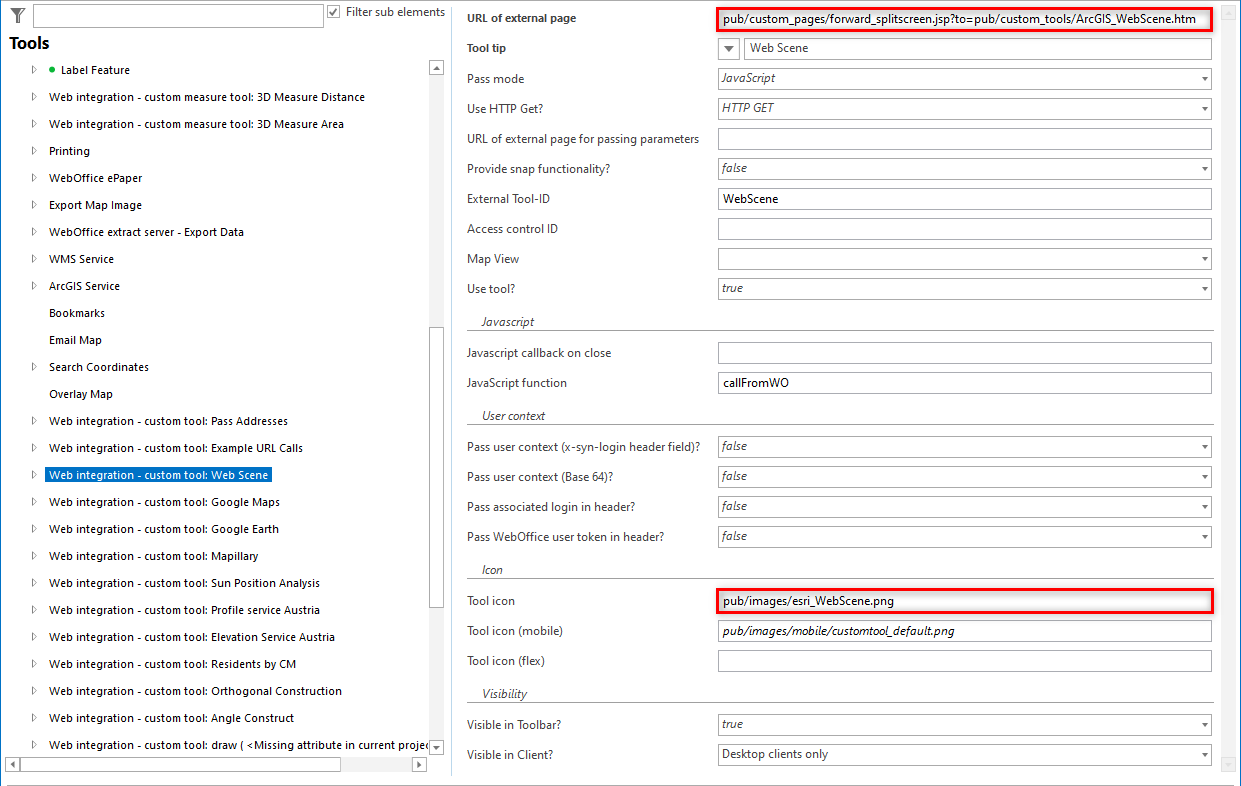
Configuring a custom tool for Web Scene
(2) Simple Custom Tool
Configure a Simple Custom Tool.

Configuring a simple custom tool for Web Scene
(3) ArcGIS_WebScene.htm - file (up to 10.9 R5)
For the integration of own WebScenes a configuration in the file ArcGIS_WebScene.htm is necessary, which can be found under the following path:
<Tomcat directory>/webapps/<WebOffice Application>/pub/custom_tools/ArcGIS_WebScene.htm
A name, a portal, and the ID of the portal item must be specified here.
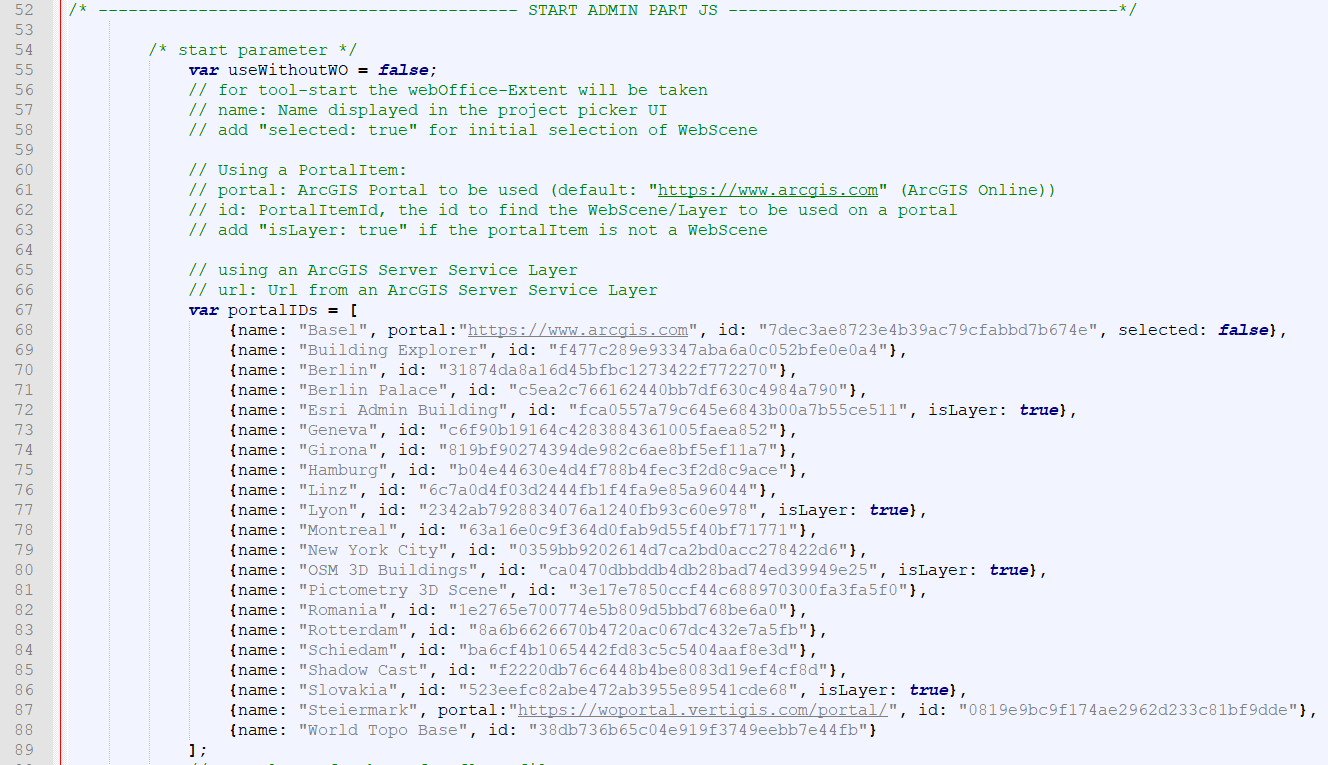
ArcGIS_WebScene.htm Datei - Inegration of own WebScenes
In general, you can specify in the ArcGIS_WebScene.htm whether a published service is a layer or a WebScene directly. Additionally the parameter 'url' has been added to support Scene servers on which different Scene services can be published. Thus also non-secured service types are supported.
|
•For further information see here: ArcGIS Enterprise Scene services |
This file can also be used to define which tools should be available and whether they should be activated or not when the tool is started.
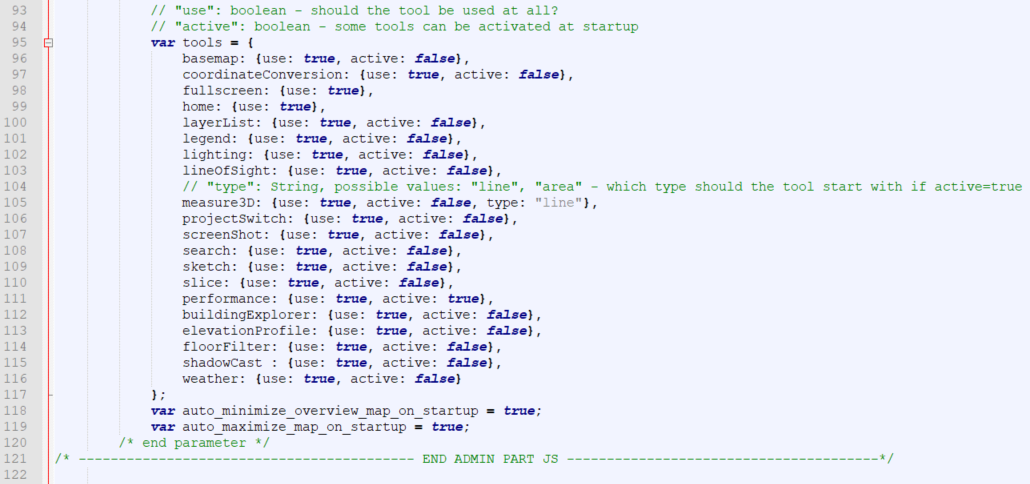
ArcGIS_WebScene.htm Datei - Availability and initial state of the WebScene tools
|
•See chapter Web Integration - Custom Tool for details about the configuration of custom tools in WebOffice author standalone. •For more information on how to use the tool in WebOffice core client see chapter Web Scene. •WebGL is not in supported in Internet Explorer 11. Because of that WebScenes are not supported in Internet Explorer 11. For more information see chapter Clientside requirements. |