Sun Position Analysis Austria

This custom tool shows a sun position analysis for any position in Austria after a click into the map. The free web service of geoland.at returns information about the horizon, the path of the sun and the theoretical sunshine duration for the selected position and the entered height above ground, plus a CSV download. Date and time of the analysis are the current values of the browser. The service opens the result in a new window.
|
More information about the web service can be found here. |

|
The tool is available in WebOffice core and WebOffice flex. In other clients it shows a note that it is not available in this WebOffice client. |

|
The tool passes the EPSG code of the map projection of the project to the service. The Esri codes 102100, 102113 and 900913 (Web Mercator) are passed as 3857, so the tool also works in projects in Web Mercator. The service supports the Austrian coordinate systems (MGI Gauss-Krüger, MGI Lambert), WGS 84, Web Mercator and UTM. In projects with another projection the service reports an error; the tool does not reproject coordinates. |
|
The custom tool is an example delivered with WebOffice and does not grant any right to use the service. The operator of the custom tool clarifies the terms of use of the geoland.at service (geoland.at/site/geoservices.html) for its own deployment. The service may be throttled or changed without notice. |
|
The browser of the users calls the service directly. The IP address of the users and the coordinates are transmitted to the operator of the service (Rechenraum GmbH), WebOffice session or user data are not. Check data protection together with the terms of use before productive use. |
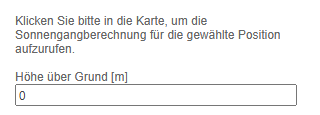
Tool form of the Sun Position Analysis Austria (German user interface)
To be able to use this function, configure the custom tool tool_form.htm from the directory C:\Tomcat\webapps\<WebOffice application>\pub\custom_tools\SonnenStandsAnalyseAT, which is delivered by default with WebOffice 10.9 R5, as follows:
(1) Web Integration - Custom Tool
Configure a custom tool from the Web integration group with the following parameters:
Parameter |
Settings |
|---|---|
URL of external page |
pub/custom_tools/SonnenStandsAnalyseAT/tool_form.htm |
JavaScript function |
callFromWO |
Tool icon |
pub/custom_tools/SonnenStandsAnalyseAT/tool_icon.png |
Tool icon (flex) |
pub/custom_tools/SonnenStandsAnalyseAT/tool_icon_flex.png |
Visible in Client? |
Desktop and Flex |
|
WebOffice flex only shows the Tool icon (flex). Without this entry the tool has no symbol there. |

Configuration of a custom tool for the Sun Position Analysis Austria
(2) Simple Custom Tool
Then, configure a Simple Custom Tool, set the parameter Tool mode to Click point and the Pass mode to JavaScript. No user context options are needed, the tool passes no user data to the service.

Configuration of a simple custom tool for the Sun Position Analysis Austria
|
The page of the service opens in a new window without access to the WebOffice window. No entry in the content security policy (see Content Security Directives) is needed for this. |
The address of the service and further settings (relativeHeightDefault, allowUserChangeHeight) are set in the admin part at the beginning of the script in the file tool_form.htm. The file readme.txt in the same directory describes them. As updates overwrite the delivered example files, copy the directory under a name of your own before you make changes.
|
For more details on configuring a custom tool, refer to the chapter Web Integration - Custom Tool. |