Mapillary

This custom tool allows the end user to open the Mapillary © widget in the WebOffice core client, which displays 360° views from the street perspective. To do this, configure the Custom Tool Mapillary.htm from the C:\Tomcat\webapps\<WebOffice application>\pub\custom_tools directory as follows:
|
WebOffice 10.9 R5 offers the technical possibilities to integrate Mapillary © into the application, but the license terms (terms of use) for using the Mapillary © service must be fulfilled in order to use the tool legally. If this is not the case, there is a license failure. VertiGIS does not assume any responsibility for the use of Mapillary © on the basis of licensing regulations. Mapillary© is an external (free) service. VertiGIS therefore has no influence on its availability. |

|
More information about Mapillary © can be found at the following link: https://www.mapillary.com/commercialterms. |

For the use of Mapillary the following basic legal aspects have to be considered:
a)No Mapillary token is provided with the custom tool. Register an own client token at Mapillary and enter it in WebOffice author standalone under Application Configuration > WebOffice > Custom Tool API Keys with the name mapillary. Changes to the application configuration take effect only after a restart of Apache Tomcat. The token is delivered to the browser; the variable client_token in Mapillary.htm is only used if no token is entered in the application configuration. Without a token, the custom tool shows a notice. The browser must be able to reach unpkg.com, graph.mapillary.com and tiles.mapillary.com.
b)For legal reasons the operator of the specific WebOffice instance is obliged to register an own Access Token.
See https://help.mapillary.com/hc/en-us/articles/360010234680-Accessing-imagery-and-data-through-the-Mapillary-API
c)The use of Mapillary is basically free of charge.
See https://help.mapillary.com/hc/en-us/articles/360020754199-Pricing
d)If own images are added to Mapillary, they are automatically available to the public according to the Creative Commons License (CC BY-SA 4.0).
See https://help.mapillary.com/hc/en-us/articles/115001770409-Licenses
(1) Web-Integration - custom tool
Configure a custom tool from the Web Integration tool group with the following parameters:
Url of the external page: pub/custom_tools/Mapillary.htm
JavaScript function: callFromWO
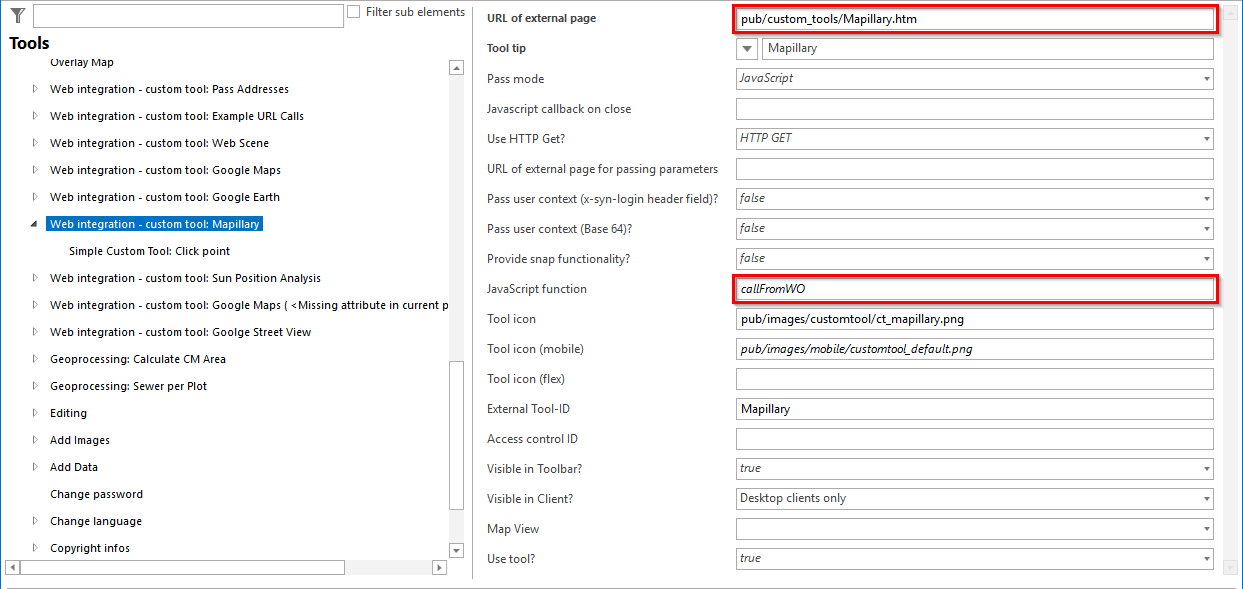
Configuration of the custom tool Mapillary
(2) Simple Custom Tool
Configure a Simple Custom Tool for the custom tool.
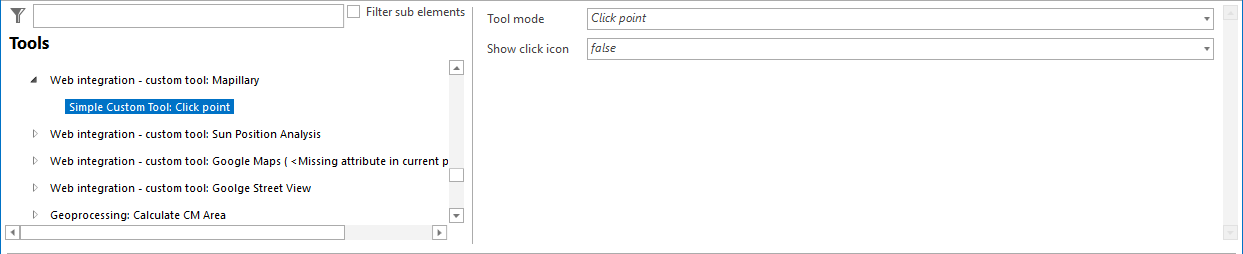
Configuration of a Simple Custom Tool for Mapillary.
|
•Under the following link you will find an ESRI Story Map with examples of Mapillary: https://mapillary.maps.arcgis.com/apps/MapSeries/index.html?appid=00305131ae3a412b9ec2c89656a0cf09 •For more details on configuring a generic tool, see the chapter Web-Integration - Custom Tool . |