WebOffice Project's Monitoring

The WebOffice 10.9 R5 application provides a call interface for monitoring specific projects. By using this call interface, it is easy to determine, whether at a certain point of time a WebOffice 10.9 R5 project is valid or not.
Monitoring the availability of projects is important for implementing
•load balancing and/or
•fail over systems.
Being able to monitor a WebOffice 10.9 R5 project it is easy to precisely provide information on availability and to implement monitoring systems, which may escalate a problem by notifying technical staff, if the availability check was negative/not successful.
Monitoring at WebOffice 10.9 R5 project level has a significant advantage: It is far more reliable than simply monitoring the server, the middleware or the GIS server (ArcGIS Server), since a test at WebOffice 10.9 R5 project level will only be positive or successful if all system components involved (hardware/software) are available and online.
Synmonitor call interface
WebOffice 10.9 R5 provides a HTTP request to check the availability of a project by using the synmonitor call interface.
So by using the parameter action the single requests can be sent as POST request (see below) to the address https://<server>/<Application>/synmonitor.
Calling via POST (recommended)
Send the parameters in the body of a POST request (application/x-www-form-urlencoded) instead of the URL. A URL including the password is stored in the access logs of Apache Tomcat and of upstream proxy servers; in this case WebOffice 10.9 R5 logs the warning SECURITY_PASSWORD_IN_URL once per application start. All examples in this chapter are POST requests with curl.exe. A call with the password in the URL (GET) still works with the same parameter names, but is not recommended.
Example with curl.exe (included in Windows 10 and Windows Server 2019 or newer):
curl.exe -d user=batchadmin --data-urlencode "password=<batchadmin password - encrypted>" --data-urlencode "project=<project>" -d action=get_project_status https://<server>/<WebOffice application>/synmonitor
Example with PowerShell:
Invoke-WebRequest -UseBasicParsing -Method Post -Uri https://<server>/<WebOffice application>/synmonitor -Body @{ user='batchadmin'; password='<batchadmin password - encrypted>'; project='<project>'; action='get_project_status' }
Monitoring tools: select the method POST in the HTTP check and enter the parameters as form data (content type application/x-www-form-urlencoded), for example:
Icinga/Nagios (check_http): check_http -H <server> -S -u /<WebOffice application>/synmonitor -T application/x-www-form-urlencoded -P "user=batchadmin&password=<batchadmin password - encrypted, URL-encoded>&project=<project>&action=get_project_status" -s OK
Icinga 2: variable http_post of the check command http with the same form data; HostMonitor and similar tools: method POST in the HTTP check and the parameters as request data.
In form data that is not encoded by the tool, the characters + / = of the encrypted password must be written as %2B %2F %3D.
Value for parameter action" |
Description |
|---|---|
- |
If no action parameter is specified, the default option get_project_status is selected, i.e. the call returns the status of projects. |
get_project_status |
Returns the status of a project |
get_service_status |
Returns the status of a service |
validate_session |
Describes the validation status of the session |
|
•Users from UserManagement cannot be used for synmonitor calls. •The encrypted password of the batchadmin user can be copied directly from the application configuration under <Application>\WEB-INF\classes\configuration\application_config.xml. |

action=get_project_status
With the parameter action=get_project_status (or without action parameter) the following answers about the status of the project can be provided:
Response |
Description |
||
|---|---|---|---|
OK |
The project is initialized and available
|
||
OK: but uses service which requires global SOE functionality and this service is not SOE core enabled |
The project is initialized and available, but the output service has not activated the SOE functionality. |
||
OK: but uses service which requires global SOE functionality and this service is not alive |
The project is initialized and available, but the output service with activated SOE functionality is not available. |
||
FAILED |
The project is not available |
||
FAILED: INITIALIZING |
The project is available and is currently being initialized |
||
FAILED: NOT_FOUND |
The project name does not exist in the application |
||
FAILED: Unauthorized |
The batchadmin user was not specified |
||
FAILED: Forbidden |
Incorrect batchadmin password was entered |
Possible responses to a Synmonitor call get_project_status"

Monitoring a WebOffice 10.9 R5 project with the Synmonitor Call interface - OK

Monitoring a WebOffice 10.9 R5 Project with the Synmonitor Call Interface - FAILED UNLOADED
With WebOffice 10.9 R5 an additional invasive synmonitor parameter named &mode= is provided. This offers the following possibilities:
Value for parameter mode" |
Description |
|---|---|
- |
returns the status if a project is initialized |
OK_if_unloaded |
returns the status whether the project is unloaded (project is not reloaded) |
reinit_if_unloaded |
returns the status whether the project is unloaded, and if so, it is initialized |
Example of a project status call with reinitialization:
curl.exe --data-urlencode "project=<Projekt>" -d user=batchadmin --data-urlencode "password=<batchadmin-Passwort - verschlüsselt>" -d action=get_project_status -d mode=reinit_if_unloaded https://<server>/<WebOfficeApplikation>/synmonitor
|
It is not necessary to use this parameter in the production system. Normally, it is not used in production scenarios, since the project is actually initialized by user interaction. |
action=get_service_status
The call specifies the status of all services in your WebOffice 10.9 R5 projects without specifying a special service:
curl.exe -d user=batchadmin --data-urlencode "password=<batchadmin password - encrypted>" -d action=get_service_status https://<server>/<WebOffice application>/synmonitor
If a special service is specified, the call specifies the status of this service:
curl.exe -d user=batchadmin --data-urlencode "password=<batchadmin password - encrypted>" -d action=get_service_status --data-urlencode "service=http://<server>:<port>/arcgis/<directory>/<service>/<service type>" https://<server>/<WebOffice application>/synmonitor
|
The ArcGIS Server Publisher is no longer part of the service identifier. It is therefore not necessary to specify the service user in the request. |
Response |
Description |
|---|---|
OK |
The service is available |
FAILED |
The service is not available |
FAILED: NOT_FOUND |
The service doesn't exist |
FAILED: No Content |
There are no services available in the project |
Possible responses to a Synmonitor call get_service_status"
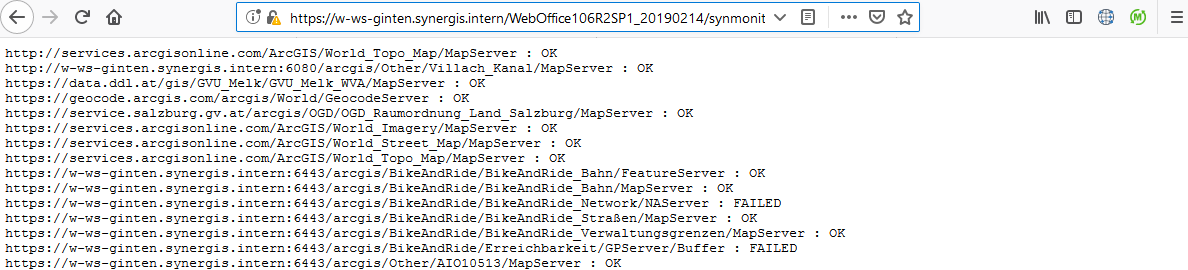
Example of the SynMonitor result response with the parameter &action=get_service_status
action=validate_session&vertigis_jsessionid=...&user=...
Used to validate sessions.
Response |
Description |
|---|---|
OK |
A session with the specified vertigis_jsessionid exists and belongs to the specified user. If no UserManagement is used, only the parameter vertigis_jsessionid has to be used without specifying a user. |
FAILED |
a] no session exists with the specified session ID, or b] the session exists, but does not belong to the specified user |
|
The response of the URL request consists of a STRING, no HTML document is returned. |
|
Please also refer to the chapter Batch Administration Request for administration of your WebOffice 10.9 R5 application. |
