Error while creating large Prints

If you receive an error message when creating WebOffice plot prints in large formats such as A0 and A1, please try the following test to narrow down the cause:
Problem description:
•The corresponding tool for printing (Legacy) is displayed in the toolbar in the WebOffice 10.9 R3 Client
•When creating the A0/A1 expression, an error message appears in the client after a few minutes.
•The printout in the PDF output format is successfully created in the ArcGIS Server output directory (by default .\arcgisserver\directories\arcgisoutput\SynOutputService_MapServer\..)
•You find the following entry in the log file (activate log categories BRIDGE for SOE Logging first):
#2018-11-26 13:52:25,655 DEBUG [ajp-nio-8009-exec-4 ] <projectname> E0F71697FAEC1F857CF56A8E62A4D2DC 1221956
FAILED :: Request: <?xml version="1.0 encoding="UTF-8 standalone="yes"?>
<SYN_CS session_id="ef50e92e-efc0-429b-bb97-b1a17b430840 xmlns:ns2="http://www.mysynergis.com/schemas/wogui_5">
<REQ id_req="1543236247857 timeout="20">
<GET_PRINT printpage_id="2137 printoutput="PDF hires_option_checked="true plot_rotation="-0.0 overview_border_color="255,204,0 subaction="get_print_user timeout="20">
<CENTERPOINT_SCALE scale="0.0 rotation="0.0"/>
<CENTERPOINT_SCALE_MULTI x="452652.62921063474 y="462687.31827714015 scale="2500.0 rotation="0.0 overlap="0"/>
<DYNFIELDS>
<DYNFIELD dynfield_id="title_value dynfield_value="Datenauszug"/>
<DYNFIELD dynfield_id="creator_value dynfield_value="<username>"/>
</DYNFIELDS>
</GET_PRINT>
</REQ>
</SYN_CS>
caused by failed to process REST operation (class: b, service: com.mysynergis.functions.geoserver.agsrest.map.o@2ea2823c[
id=https://gisserver.domain.com/arcgis/SynOutputService/MapServer
serverUrl=https://gisserver.domain.com/arcgis
] ) due to an unexpected error
caused by Socket exception. Connection reset
Cause of problem:
•In this case it seems that the connection to the client was closed by the server. This may be a problem with the request you were sending, or a problem at its end.
•Check the following points:
oHow is the Timeouts for Printing (Legacy) parameter configured the WebOffice application configuration?
oIs a proxy server in use? The reason for this is that almost every proxy server cancels requests after a certain duration.
oAre timeouts set high enough at the SynoutputService?
•Please try the following tests to better determine the cause:
oPerform print tests directly via services > SynOutputService (MapServer) > SynSOEGateway > soe_base
oThe print request from the WebOffice log file (BRIDGE log category for SOE logging must be activated beforehand) must be inserted in the soe_q field.
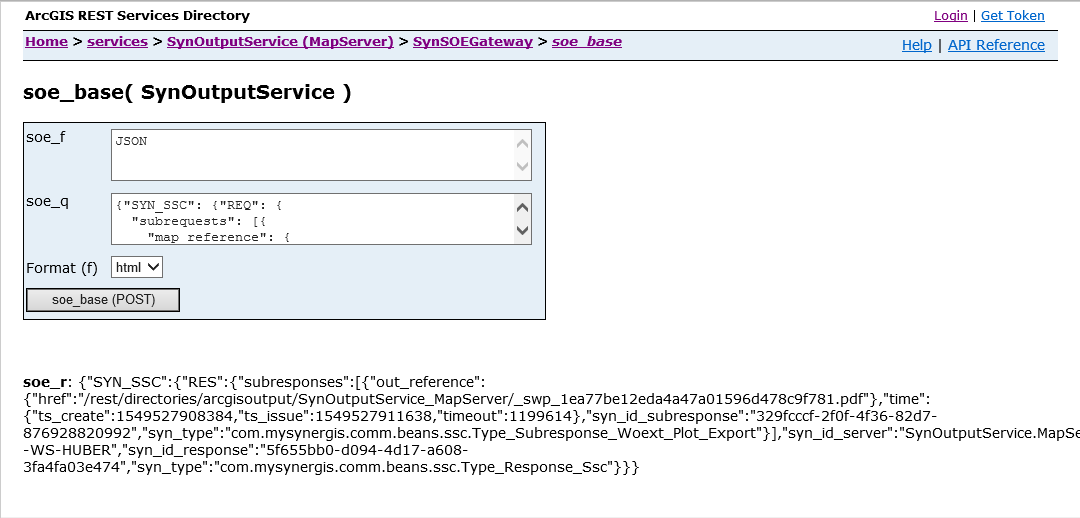
print test directly via SynSOEGateway by SynOutputService
oPlease note: This soe_base page must be called with different URLs in the browser in order to narrow down the cause of the problem.
▪Test with internal Server URL with ArcGIS Server Port (https://gisserver:6443/arcgis/..): Print SUCCESSFUL (response shows path to the created PDF)
▪Test with Server URL via Web Adaptor (https://gisserver.domain.com/<webadaptorname>/..): Print SUCCESSFUL (response shows path to the created PDF)
▪Test with URL via LoadBalancer URL (https://loadbalancerURL.domain.com/<webadaptorname>/..): Pint FAILED (error message in browser ==> The problem is to be found in the IT of the customer, because the LoadBalancer configuration has to be adapted (probably threshold values, timeouts, etc.).