How to get WebMap_as_Json String |
  
|
How to get WebMap_as_Json String |
|
Whenever you face any problem while creating print outputs, it might be useful to check the generated WebOffice logfile and especially the created WebMap_as_Json string, in order to create appropriate information upfront contacting the Support and Services Team.
In the WebOffice logfile you might find important information in order to be able to generate qualified support requests of VertiGIS Printing.
1. Set NET an UTIL to DEBUG
Set the WebOffice application logger NET and UTIL in SynAdmin in the Logging Tab to DEBUG.
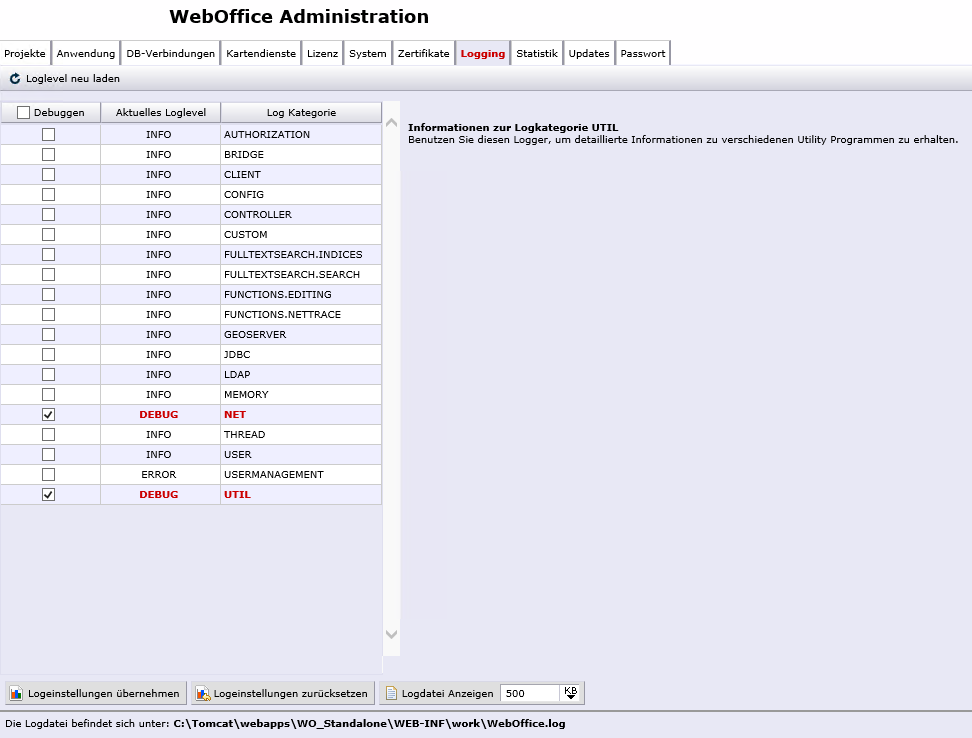
Set loglevel NET and UTIL to DEBUG
2. Replicate the issue
Replicate the issue in the WebOffice client by doing a print.
3. Check the logfile
Check the WebOffice logfile. You will find a WebMap as JSON string within the section 'debugginRequest (decoded)':

WebMap as JSON String in WebOffice Lofile
4. Reset the Server Object Extension log levels
After analyzing the logfile don't forget to reset the log levels of your WebOffice application.