Apache Tomcat Configuration |
  
|
Apache Tomcat Configuration |
|
This chapter contains several guidelines how to configure Apache Tomcat after a successful installation. These post installation configuration settings will be defined in the Apache Tomcat Properties. Therefore, open the Tomcat configuration tool either from the Start menu or from the notification icon in the taskbar. Consider the previous chapter if you do not find the Tomcat Properties.
Note: Please see chapter Apache Tomcat Maintenance for details how to start/stop the Tomcat service.
Note: For details on the Tomcat Java properties, see here.
Tomcat memory settings (mandatory)
•Initial memory pool: this specifies the memory which is allocated when Tomcat starts
•Maximum memory pool: this specifies the maximum memory Tomcat is allowed to allocate
Note: It is recommended to set the Initial memory pool to at least 256 MB and the Maximum memory pool to at least 4096 MB.
Note: Please increase the maximum memory pool depending on the number of WebOffice 10.8 SP2 applications, projects and access as well as on users' interactions (e.g. printout).

Apache Tomcat configuration - Java memory settings
After changing the Java options the Apache Tomcat must be restarted otherwise the changes will not take effect.
Apache Tomcat Character Encoding
Apache Tomcat 8 changed the default value for character encoding.
When using external calls to WebOffice 10.8 SP2 (WebOffice APIs, WebOffice map widget) with special characters please adapt the Tomcat settings for the encoding. To use the default encoding from Tomcat 7, configure the parameters URIEncoding='ISO-8859-1' useBodyEncodingForURI='true' as in the example below (C:\Tomcat\conf\server.xml) for both ports, 8080 and 8009 (apache connector):
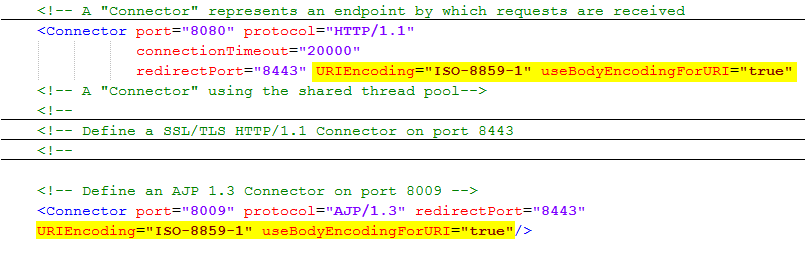
Adaptations in file "server.xml" by Apache Tomcat
With this setting the character encoding ISO-8859-1 will be used for GET and POST requests. You can use any other encoding explicitly in the request.