Settings |
  
|
Settings |
|
The application profiles are selected and managed in the settings.
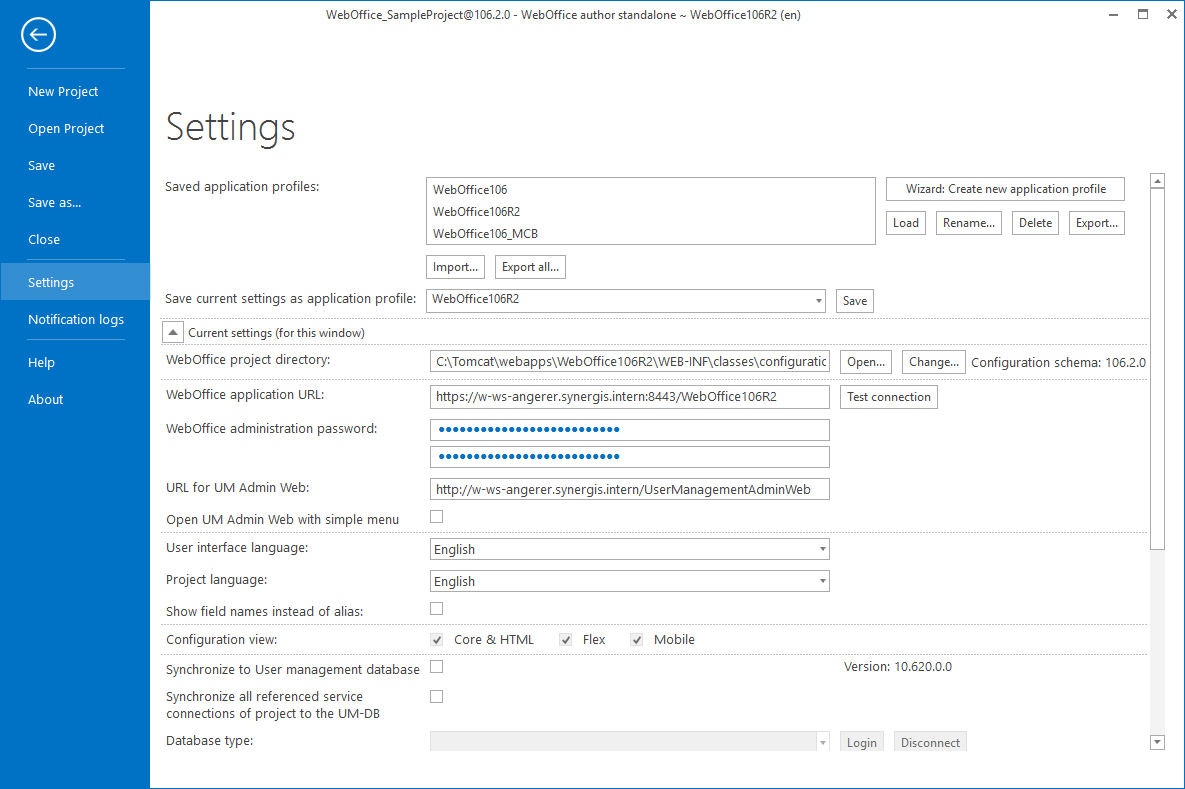
Settings of WebOffice author standalone
Option |
Description |
Existing application profiles can be called, renamed, deleted or exported here. A new application profile can also be created using a wizard. You can either create your own application profile or import existing profiles from the old WebOffice author extension. |
|
Save current settings as application profile |
Saves all current settings defined below under the name specified here. |
WebOffice project directory |
Enter the path to the WebOffice project directory here. (<application>\web-inf\classes\configuration\projects\) |
WebOffice Application URL |
The path to the WebOffice application is specified here. (http(s)://<server>(:<port>)/<application> |
WebOffice application password |
Synadmin password of the application |
URL for UM Admin Web |
URL to UM Admin Web in the form http(s)://<server>(:<port>)/<UserManagement application> |
Open UM Admin Web with simple menu |
Specifies whether the UMAdminWeb button should be opened in a simple menu when clicking on it. |
User interface language |
Specifies the language of the WebOffice author standalone user interface. |
Project language |
Specifies the default language of the projects in the application. |
Show field names instead of alias |
Determines whether fields are displayed by their technical field name or the specified alias. |
Configuration view |
Provides specific configuration views to facilitate configuration of specific clients (Core/HTML, Flex, Mobile) |
Synchronise to User management database |
Determines whether the settings made in WebOffice author standalone are to be synchronized to a user management database. |
Synchronize all referenced service connections of project to the UM-DB |
This setting also allows to synchronize layers of published services that are connected. If this option is not selected, only layers connected to ArcMap or ArcGIS Pro are synchronized with the user management. Note: The activation of this function can have negative effects on the performance of the WebOffice author standalone. You can perform full synchronization without saving at any time when the project is open by right-clicking the user management icon in the footer. |
Database type |
Database type of the user management database |
Server |
Server of the user management database |
Database |
Name of the user management database |
User |
User of the user management database |
Password |
Password of the user of the user management database |
Connect to ArcMap/ArcGIS Pro on other Users |
If this option is activated, other users can also connect to ArcMap or ArcGIS Pro. |
Mobile+ project directory (optional) |
Optional path to the Mobile+ project directory |
Debug mode |
If this option is activated, various additional expert tools are available in the "Tools" tab. |
When this function is activated, the entire network traffic between the WebOffice server and the WebOffice author standalone is logged in the author log at %APPDATA%\Roaming\SynerGIS\WebOfficeAuthorStandalone\logs\MainAuthor_debug.txt.
Note: This function is only available when the debug mode is activated. |
|
Query HTTP services |
If this option is activated, HTTP services can also be queried. |
Create automatically backup of projects |
If this option is activated, under <application>\WEB-INF\classes\configuration\projects\AutoBackup, automatic backups of the currently opened project configuration including timestamp are created every 10 minutes. |
Minimal filter length for search |
Specifies the minimum number of characters that must be defined in the filter to get results. |