ArcGIS Server Feature Service |
  
|
ArcGIS Server Feature Service |
|
With an ArcGIS Server Feature Service ArcGIS Server services with feature access can be embedded into the project. Layers from feature services can be configured for Editing. As of WebOffice Version 10.6 R2 SP1, a feature service can also be used to display objects on the map. Configure Map Service Properties for the map service to manage specific properties for a particular service.
For using layers from a feature service to be edited first configure the Edit Layer based on the map service and refer to the layer from the feature service.
Note: Using WebOffice Version 10.6 R2 SP1 or higher, a ArcGIS Feature Service can be used for displaying a map image.
Note: The display of ArcGIS Server Feature Services is only supported in the clients based on ArcGIS API for JavaScript WebOffice flex and WebOffice coreJS. However, the feature services are not yet selectable or identifiable. However, the range of functions is constantly being extended.
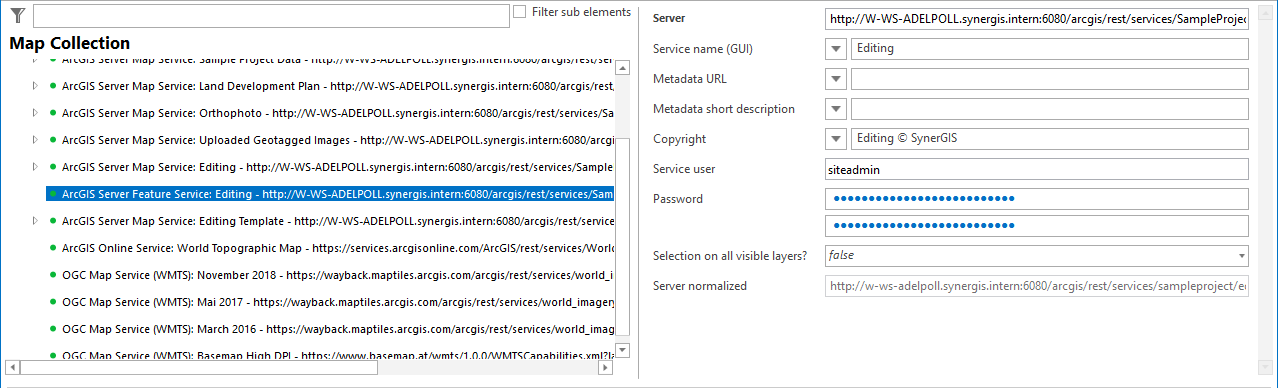
ArcGIS Server Feature Service configuration
Property |
Description |
Server |
Specifies URL of ArcGIS Server feature service. Example for an ArcGIS Server Feature Service: https://<myserver>/ArcGIS/rest/services/<myService>/FeatureServer If you are connecting to an ArcGIS Server federated in a Portal for ArcGIS or are connecting to an ArcGIS Online service, be sure to use the service according to Esri Inc. Terms of Use! https://developers.arcgis.com/terms/ and http://www.esri.com/legal/software-license Note: A map service may only be used once in a map collection. I.e. you have to configure a single map service as overview map for example. |
Service name (GUI) |
Service name of the feature service displayed in the GUI. |
Metadata URL |
Allows you to store a reference to a metadata document (htm, html, pdf, jpg, etc.) in the form of a URL. The metadata document must be accessible via HTTP. Note: You may configure the unique Metadata document identifier (UUID) of a Catalog Service (CSW 2.0) here. In this case you must configure the SOAP interface of the Catalog Services in Metadata Display. |
Metadata short description |
Provide a short description for the metadata (line breaks with "\n"). |
Service specific copyright text to be added to the configured project copyright if the map service contributes to the map. Note: The service specific copyright will only be displayed if the map element Copyright is configured. Note: Detailed information about the use of these attributes can be found in chapters Template (File Name) and WebOffice ePaper Template (File Name). |
|
Service user |
User login for accessing the ArcGIS Server service (ArcGIS service user). |
Password |
Password of user accessing ArcGIS Server service. |
Selection on all visible layers? |
When using the option 'All visible Layers' in the Client, all Feature Layers that are visible in the current scale and set to visible are taken into consideration. A Layer configuration is not required, the ArcMap Layer Properties get used instead (Layer Name, visible Fields, Field order) |
Server normalized |
Normalized server URL (not changeable) |
ArcGIS Server Feature Service properties
When setting up a layer from the Feature service for editing, you first configure an editing layer from the map service and then add the layer from the Feature service.
Note: An easy way to configure an ArcGIS Server Feature Service is by using the wizard Add Service.
Note: See chapter Map Service Properties for details about the configuration of map service properties.
Note: See chapter Edit Layers for details about the configuration of edit layers based on feature services.
Note: If you want to save html content via the feature service, you have to enable it directly at the feature access under 'Advanced Options...'.