Install WebOffice Application |
  
|
Install WebOffice Application |
|
Below you will find the necessary installation steps for manually installing WebOffice 10.6 R2 SP2.
•Create a folder (e.g. "WebOffice") for WebOffice 10.6 R2 SP2 in your Tomcat-Web Application folder C:\Tomcat\webapps\
•Copy WebOffice106R2.zip from directory WebOffice10.6R2-DVD\Software\WebOffice Web Application\unpackaged\ into it and unzip it there. Delete the ZIP file afterwards.
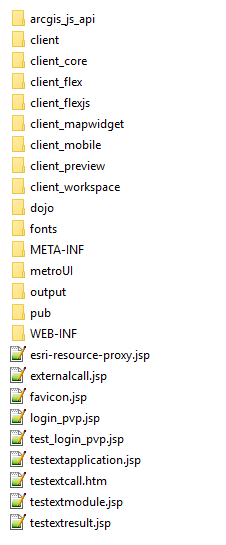
Directory structure of WebOffice 10.6 R2 SP2 web application