Setting up the WebService |
  
|
Setting up the WebService |
|
The WebService is configured through the Web.config. The Web.config file is by default stored in the web service directory (C:\inetpub\wwwroot\ePaperWebservice).
Use the section <appSettings> to set the following parameter:
•IPAddress: The IP address of the host. By default the IP address is set to 127.0.0.1.
•Port: The port of the host. By default the port is set to 12000.
•MXDPath: Defines the path to the directory where the map documents (.mxd) are stored.
•ReportPath: Defines the path to the directory where the ePaper templates (.mrt) are stored.
•OutputPath: Defines the path to the directory where the generated ePaper reports are stored. Additionally, you have to define the output directory as virtual directory in IIS:
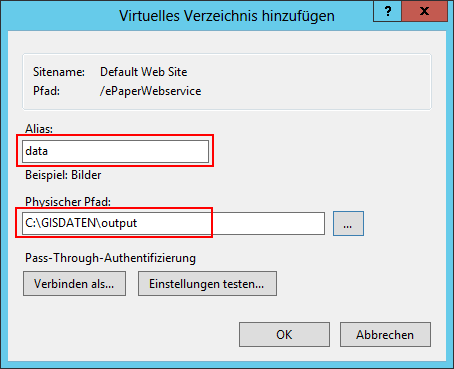
IIS - define virtual directory
•HttpPath: Defines the URL to view the ePaper reports.
•pdf_jpeg_image_quality: Defines the quality of the images inside a report. By default the quality is set to 0.85.
•cleanup_intervall: Defines the interval in which the generated reports inside the output directory are deleted. By default the interval is set to 10 minutes.
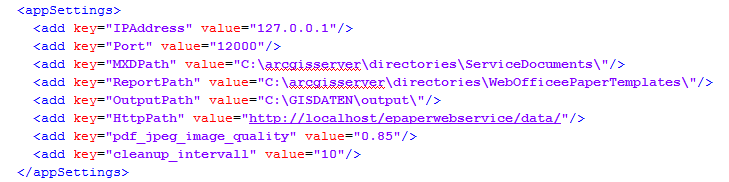
Web.config
To reduce Timeout errors when creating complex reports, it's possible to change the parameters executionTimeout and shutdownTimeout in Web.config as well:

timeout settings - Web.config