Setting up the WebService |
  
|
Setting up the WebService |
|
The WebService is configured through the Web.config. The Web.config file is by default stored in the web service directory (C:\inetpub\wwwroot\ePaperWebservice).
Use the section <appSettings> to set the following parameter:
•IPAddress: The IP address of the host. By default the IP address is set to 127.0.0.1.
•Port: The port of the host. By default the port is set to 12000.
•MXDPath: Defines the path to the directory where the map documents (.mxd) are stored.
•ReportPath: Defines the path to the directory where the ePaper templates (.mrt) are stored.
•OutputPath: Defines the path to the directory where the generated ePaper reports are stored. Additionally, you have to define the output directory as virtual directory in IIS:
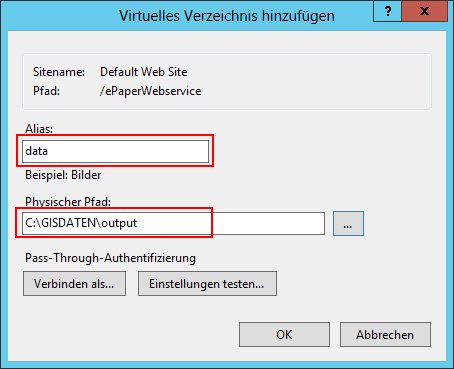
IIS - define virtual directory
•HttpPath: Defines the URL to view the ePaper reports.
•pdf_jpeg_image_quality: Defines the quality of the images inside a report. By default the quality is set to 0.85.
•cleanup_intervall: Defines the interval in which the generated reports inside the output directory are deleted. By default the interval is set to 10 minutes.
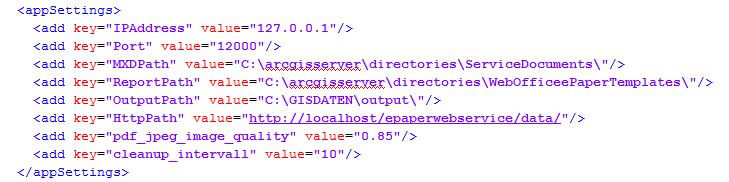
Web.config