Geoprocessing Output Parameter |
  
|
Geoprocessing Output Parameter |
|
Define a Geoprocessing Output Parameter.
Note: This chapter only refers to the configuration of the Geoprocessing tool in WebOffice author. See HowTo chapter Prepare a Geoprocessing Service for information about the parameters supported by WebOffice 10.3 SP2.

Geoprocessing output parameter configuration
Property |
Description |
Name of the Geoprocessing parameter |
Name of the Geoprocessing output parameter which should be pre-initialized with a given value. Note: Open the geoprocessing task REST URL in a browser in order to identify the available geoprocessing parameters easily. Example: http://<myserver>/ArcGIS/rest/services/<myService>/GPServer/<geoprocessing task>
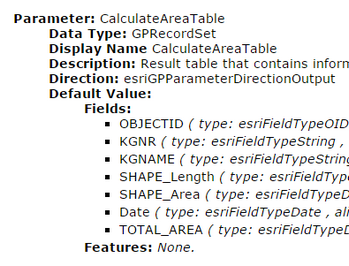 Identify geoprocessing parameter name in the ArcGIS REST services directory
|
Alias name of the Geoprocessing parameter |
Alias name of the Geoprocessing output parameter, which is shown within the Table of contents, as well as in the caption of a result list. |
Specifies whether the user may change or set the input parameter value. |
Geoprocessing output parameter properties
Note: See chapter ArcGIS Server Geoprocessing Service for details about the configuration of the ArcGIS Server Geoprocessing Service in WebOffice author.
Note: See chapter Geoprocessing for details about the tool configuration in WebOffice author.
Note: With WebOffice 10.3 SP2 it is possible to pass parameters dynamically to the geoprocessing tool. See HowTo chapter Integrate Geoprocessing for details.