Object Assignment layers (topological) |
  
|
Object Assignment layers (topological) |
|
Object Assignment Layers (topological) specifies the layers to be used as source layers for topological object assignment.
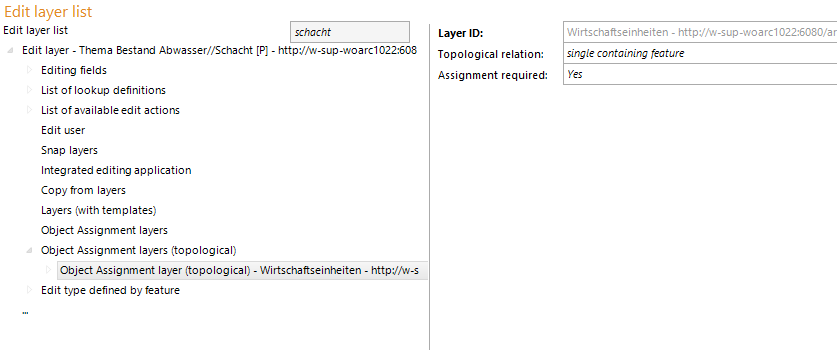
Configuration - Object Assignment layer (topological)
Property |
Description |
||||||||
Layer-ID |
Explicit ID of the layer, which will be used for topological object assignment. |
||||||||
Topological relation |
Defines the required topological relation. Selection:
(Whole feature has to be included)
(Intersection possible)
(In case of intersection, majority of feature has to be included)
(no intersection) |
||||||||
Assignment required |
Defines whether object assignment is required for editing |
Properties - Object Assignment layer (topological)
Hinweis: It is also possible to configure more than one reference layer. In that case all assigned attribute values will be assumed on the target/edit-layer.
On the reference layer for topological assignment, fields can be coupled together. This specifies the fields to be paired upon object assignment. Thus it is possible to assume the field-values from the reference-layer automatically (during an editing operation).
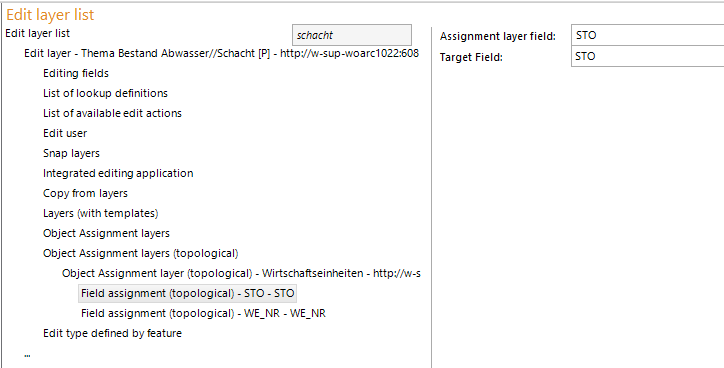
Configuration - Field assignment (topological)
Properties |
Description |
Assignment layer field |
Fieldname on assigment layer. |
Target Field |
Target inputfield. An existing inputfield configuration is required. |
Properties - Field assignment (topological)
Note: The fields of the reference-layer (for field assignment) have to be configured also as search- and resultfields on the search-layer.
The linked fields which are filled automatically, will be shown gayed in the editing-dialog (edit actions edit, delete).
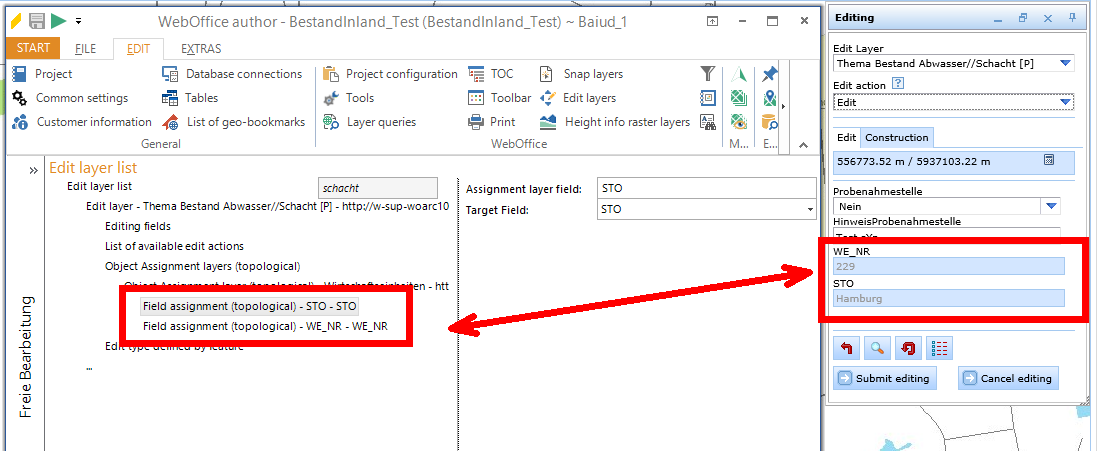
Note: See chapter Editing with topological assignment for details about editing in the WebOffice html client.