ArcGIS Server Feature Service |
  
|
ArcGIS Server Feature Service |
|
With an ArcGIS Server Feature Service ArcGIS 10.3 for Server services with feature access can be embedded into the project. Layers from feature services can be configured for Editing. The feature service cannot be used for displaying features in the map. Configure Map Service Properties for the service to manage several properties specifically for a certain service.
For using layers from a feature service to be edited first configure the Edit Layer based on the map service and refer to the layer from the feature service.
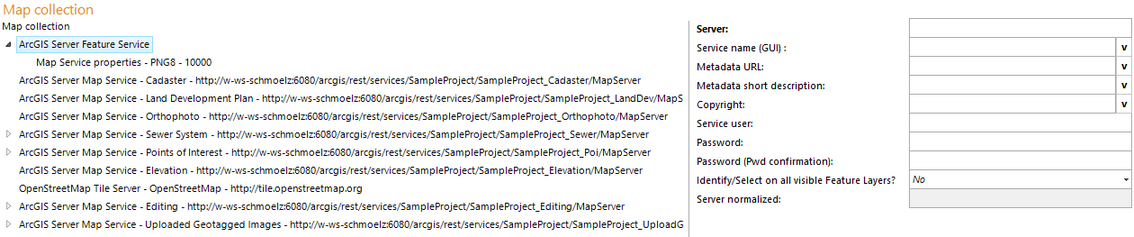
ArcGIS Server Feature Service configuration
Property |
Description |
Server |
Specifies URL of ArcGIS Server feature service. Example: |
Service name (GUI) |
Service name of the feature service displayed in the GUI. |
Metadata URL |
Configure a reference to a metadata document (must be available via HTTP) as URL. Note: You may configure the unique Metadata document identifier (UUID) of a Catalog Service (CSW 2.0) here. In this case you must configure the SOAP interface of the Catalog Services in Metadata Display. |
Metadata short description |
Provide a short description for the metadata (line breaks with "\n"). |
Service specific copyright text to be added to the configured project copyright if the map service contributes to the map. Note: The service specific copyright will only be displayed if the map element Copyright is configured. Note: Detailed information about the use of these attributes can be found in chapters Template (File Name) and WebOffice ePaper Template (File Name). |
|
Service user |
User login for accessing the ArcGIS 10.3 for Server service (ArcGIS service user). |
Password |
Password of user accessing ArcGIS 10.3 for Server service |
Password (Pwd confirmation) |
Password confirmation |
Server normalized |
Normalized server URL |
ArcGIS Server Feature Service properties
Note: An easy way to configure an ArcGIS Server Feature Service is by using the wizard Add Service.
Note: See chapter Map Service Properties for details about the configuration of map service properties.
Note: See chapter Edit Layers for details about the configuration of edit layers based on feature services.
Note: If you want to save html content via the feature service, you have to enable it directly at the feature access under 'Advanced Options...'.