List of Project Tiles |
  
|
List of Project Tiles |
|
The List of project tiles configures the appearance of various WebOffice 10.3 SP2 projects based on the project ID as a project tile.
Note: The requirements for this section is the configuration of the property "modern" within the project linking landing page and the creation of the various projects within the list of projects.
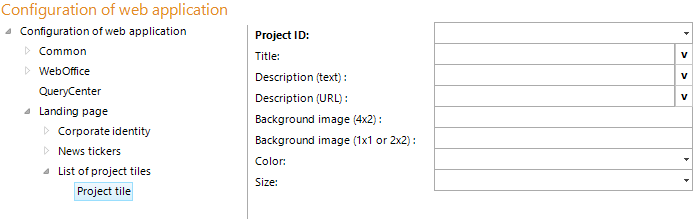
Configuration - List of project tiles
Property |
Description |
Project ID |
Unique project id of the project from which other projects may be called. |
Title |
Title of the tile |
Description (text) |
A more detailed description (some text) |
Description (URL) |
Link to the homepage with a more detailed description of the content (http://...) Note: When using an URL, always start with HTTP://. |
Background image (4x2) |
Thumbnail URL (http://...) for the background image of the tile. Minimum image size 280x140 pixels, maximum image size 296x146 pixels Note: When using an URL, always start with HTTP://. |
Background image (1x1 or 2x2) |
Thumbnail URL (http://...) for the background image of the tile, with size 1x1 (Minimum image size 65x65 pixels, maximum 71x71 pixels) or 2x2 (Minimum image size 140x140 pixels, maximum 146x146 pixels). Note: When using an URL, always start with HTTP://. |
Color |
Style of the tile - the colors |
Size |
Size of the tiles |
Configuration parameters - List of project tiles