Position |
  
|
Position |
|
In this section it's possible to specify the initial map extent of the WebOffice project by using
| • | either X/Y |
| • | or LAT/LON |
coordinates.
It's also possible to configure one or several different markers at specific positions.
Note: Markers can only be set to WGS84 coordinates (latitude/longitude).
Input parameter |
Description |
||||
Use X/Y or Use Lat/Lon |
Activates to option to zoom to specific coordinates. It is possible to use
|
||||
X or Lat: |
Identifies the X coordinate or the latitude to be zoomed to. |
||||
Y or Lon: |
Identifies the Y coordinate or the longitude to be zoomed to. |
||||
set coordmarker |
Activates the functionality to display one or several Meeting Point Symbols on specific positions in the map. Note: Markers can only be set to WGS84 coordinates (latitude/longitude). |
||||
marker ID |
External Marker-ID of the Meeting Point Symbol in the WebOffice 10.3 SP2 project. |
||||
Lat |
Specifies the latitude of the marker symbol. |
||||
Lon |
Specifies the longitude of the marker symbol. |
Input parameter - Position in WebOffice map widget testcontainer
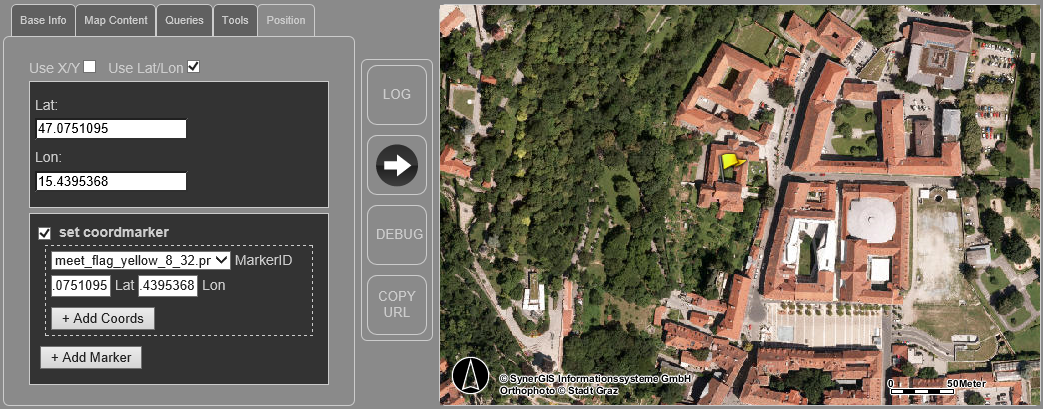
WebOffice map widget testcontainer - Position
Note: When pressing the buttons "Add Coords"/"Remove Coords" the request is extended/reduced with additional coordinates of the same marker id. By using this option it is possible to set the same symbol at different positions.
Note: When pressing the buttons "Add Marker"/"Remove Marker" the request is extended/reduced with additional new marker symbols. By using this option it is possible to set different marker symbols at different positions.
Note: Please find more details about the configuration of marker symbols in WebOffice author in the chapter Meeting Point.