Configure a Custom Function Field |
  
|
Configure a Custom Function Field |
|
Configure a custom function field if
| 1. | Specify the parameters of the custom function field in WebOffice author. In the example the Custom function field is specified for print template A4_portrait. |

Function field "myfunctionfield_value"
| 2. | Open ArcMap and open the SynPlotService.mxd (usually located in <ArcGIS Server location>\directories\WebOfficePlotTemplates) |
| 3. | Open the layout file A4_portrait.layout using WebOffice plot author and insert a user text from the WebOffice plot author toolbar. |

Insert user text button in WebOffice plot author toolbar
| 4. | Enter the field value specified in WebOffice author in the field Name. |
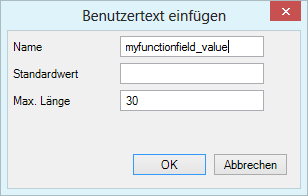
Change function field ID in function field properties dialog
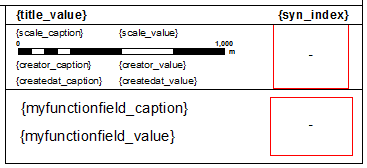
Layout view with added function field "myfunctionfield_caption" & "myfunctionfield_value"
| 5. | Reload resources in SynAdmin and start your WebOffice 10.3 SP2 project. The print tool form in the WebOffice html client will include the configured custom function field. |
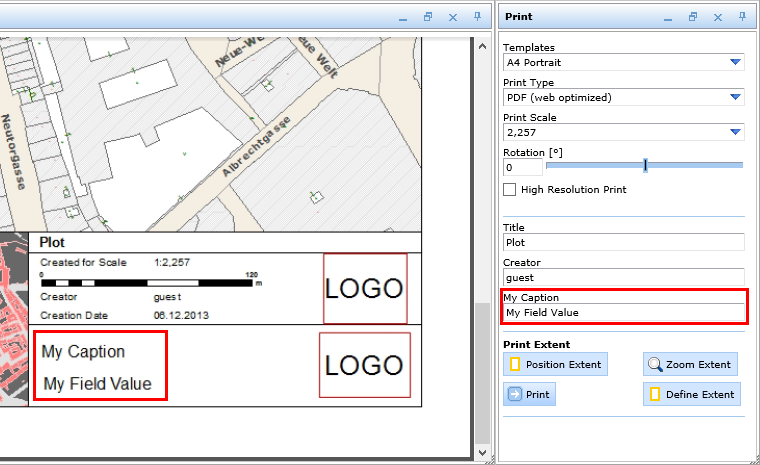
Custom function field in the print tool form and output of the WebOffice html client
Note: See also chapter Custom Function Fields.