WebOffice Administration Page |
  
|
WebOffice Administration Page |
|
WebOffice 10.2 SP3 provides administration pages called SynAdmin that includes eleven tabs:
| • | Projects Tab: overview and manage all projects of the WebOffice 10.2 SP3 application |
| • | Application Tab: perform various administrative functions regarding the application itself |
| • | Database Connections Tab: overview any configured database connections of your WebOffice 10.2 SP3 projects |
| • | Map Services Tab: find information about every map service used by your WebOffice 10.2 SP3 projects |
| • | Full-Text Search Tab: see full-text search specific details and administer the creation of its subindices |
| • | License Tab: check WebOffice 10.2 SP3 license status |
| • | System Tab: display important information about the runtime system |
| • | Logging Tab: manage log settings and view log file |
| • | Statistics Tab: view and/or export statistics |
| • | Updates Tab: access updates |
| • | Password Tab: manage the SynAdmin password |
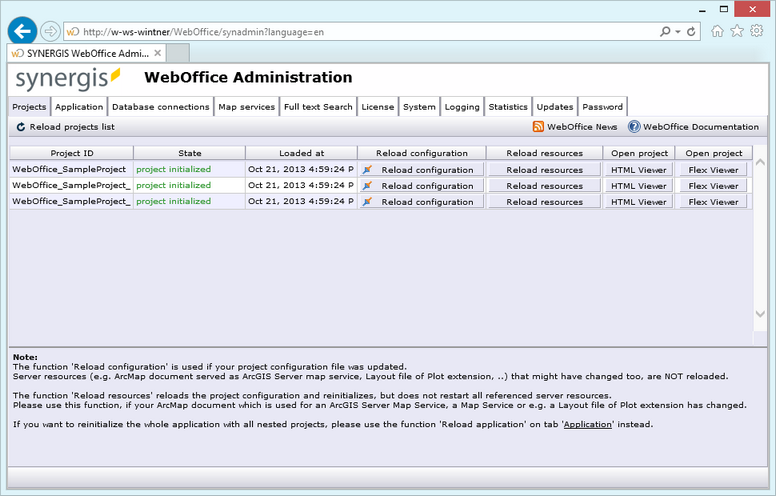
SynAdmin with opened projects tab
Additionally, there are two buttons in the bar on top of the administration page.
Button |
Description |
|
Links to the online user manual. |
|
Links to the online WebOffice news page. Note: It is possible to subscribe the WebOffice news page as RSS feed. |
Note: A golden rule for successfully managing a server application is NEVER ADMINISTER DURING REGULAR OPERATION TIME, i.e. you should do your administration work after users have finished their work (e.g. from 5 or 6 pm on) or before they have even started (e.g. before 7 or 8 am).
In the subsequent chapters you will find a detailed description of WebOffice 10.2 SP3 administration pages tabs and functions.

