Neustart des Servers |
  
|
Neustart des Servers |
|
Bitte überprüfen Sie zuerst ob ein Neustart des Servers Sinn macht. Falls ja, benutzen Sie bitte ein Script welches einen sauberen Start in der korrekten Reihenfolge garantiert. Der folgende Teil eines Scriptes kann in Verbindung mit einer .bat Datei durch Benutzung einer täglichen Ausführung in der Windows Aufgabenplanung ausgeführt werden.
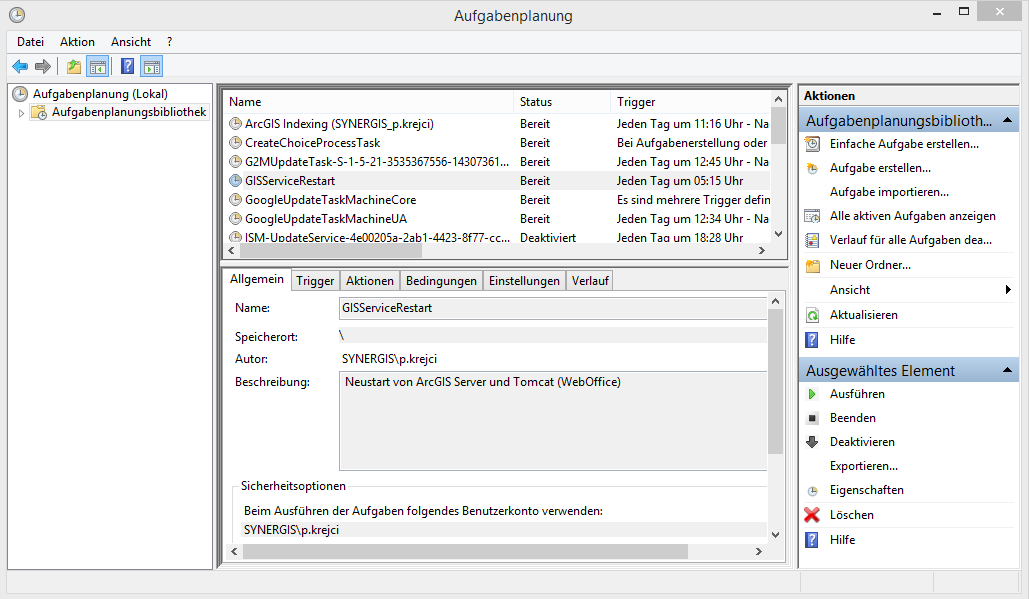
Windows Aufgabenplaner - Konfiguration für täglichen Server Neustart
@ECHO OFF
REM *****************************************************************
REM * GIS Server Restart *
REM * *
REM *****************************************************************
SET REVNR="$Revision: 6 $"
SET REVDATE="$Date: 8.01.14 19:24 $"
@ECHO ON
echo "Start of Restart of ArcGIS Server/IIS/Tomcat/WebOffice: "
date /t
time /t
REM STOPPING-Windows-Services
REM =========================
net stop "Apache Tomcat 7.0 Tomcat7" /y
net stop "Tomcat7" /y
@ECHO OFF
ping -t localhost -n 15
net stop "ArcGIS Server" /y
ping -t localhost -n 30
@ECHO ON
net stop "World Wide Web Publishing Service" /y
net stop "IIS Admin Service" /y
@ECHO OFF
REM wait for 30 seconds
ping -t localhost -n 30
@ECHO ON
REM Starting-Windows-Services
REM =========================
net start "IIS Admin Service"
net start "World Wide Web Publishing Service"
net start "ArcGIS Server"
@ECHO OFF
REM Wait 210 seconds - using ping - portable to other Windows Version
REM as there are now all services stopped 30 seconds are enough
ping -t localhost -n 15
REM Wait X seconds - using ping - portable to other Windows Version
ping -t localhost -n 15
@ECHO ON
REM Restart IIS to Update REST-Interface
REM ====================================
net stop "World Wide Web Publishing Service" /y
net stop "IIS Admin Service" /y
net start "IIS Admin Service"
net start "World Wide Web Publishing Service"
REM Finally TomCat start
net start "Apache Tomcat 7.0 Tomcat7"
net start "Tomcat7"
echo "End:"
date /t
time /t
@ECHO OFF
Hinweis: Falls eine Volltextsuche in ihrer WebOffice 10.2 SP3 Applikation konfiguriert ist, kann durch die Benutzung eines Kommandos in dem .bat Skript alle Subindizes neu berechnet werden.
Nähere Informationen finden Sie im Kapitel Batchfähige Administrationsrequests.