Troubleshooting and problem solution

WebOffice 10.9 R5 includes detailed logging and debugging functions. The central information point is the WebOffice 10.9 R5 administration pages that can be accessed either via WebOffice author

Open the WebOffice 10.9 R5 administration pages from WebOffice author
or by typing the following URL into your browser: https://<server name>[:<port>]/<WebOffice application name>//synadmin (e.g. http://myserver:8080/WebOffice/synadmin)
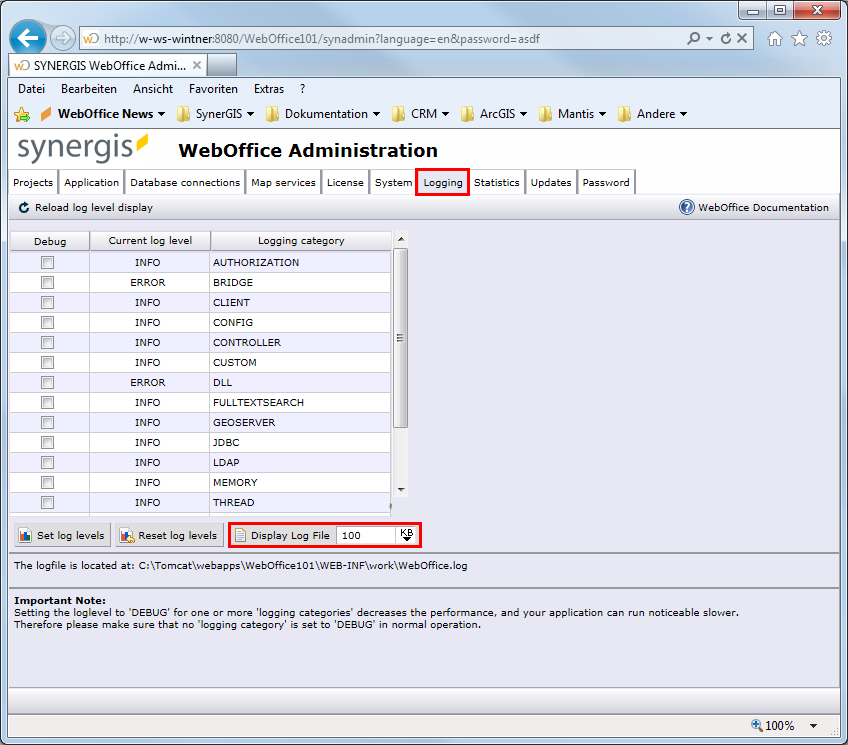
WebOffice 10.9 R5 administration pages - logging
Go to the Logging tab where you will find several logging categories with different log levels set. It is possible to turn on/off debugging for a category on the fly without stopping and restarting the WebOffice 10.9 R5 application. The default settings for the loggers are read from the file log4j.properties which resides in:
C:\Tomcat\webapps\<WebOffice application>\WEB-INF\classes\configuration\log\log4j.properties.
The location of the WebOffice 10.9 R5 log file (WebOffice.log) is shown in the lower part of the site. By default it gets stored into:
C:\Tomcat\webapps\<WebOffice application>\WEB-INF\work\WebOffice.log
Note: Logging on DEBUG level generates a lot of debug information that can be used for support for tracking down problems. You can set/change the log level on the fly without stopping the WebOffice 10.9 R5 web application. This makes error tracking and analysis in production systems far easier because they do not have to be stopped.
Note: Be aware that logging on DEBUG level can have a massive impact on system performance due to the large amount of information. See the information below regarding the particular log categories and set the log levels for them according to the occurring problems. Always reset log levels afterwards!
Log Category |
Default Log Level |
Description |
AUTHORIZATION (AU) |
INFO |
Use this logger for getting detailed information on authentication (user identification) and authorization (user rights). |
BRIDGE (BR) |
ERROR |
Use this logger for getting detailed information on IN/OUT communication between WebOffice and complementary server modules: •WebOffice plot extension •WebOffice ePaper extension •WebOffice extract server extension •Geonis Server Extension |
CLIENT (CL) |
INFO |
Use this logger for getting detailed information on Client/Server communication as well as GUI functionality. |
CONFIG (CF) |
INFO |
Use this logger for getting detailed information on configuration file processing - especially project configuration file processing. |
CONTROLLER (CO) |
INFO |
Use this logger for getting detailed information on HTTP servlet, session and error handling (e.g. how requests will be received). |
CUSTOM (CU) |
INFO |
Use this logger to get detailed information about customer specific WebOffice extensions. |
INFO |
Use this logger for getting detailed information about creating subindices of the full-text-search. |
|
INFO |
Use this logger for getting detailed information about queries and results of the full-text search. |
|
FUNCTIONS.EDITING (ED) |
INFO |
Use this logger to get detailed information about editing functionality |
FUNCTIONS.NETTRACE (NT) |
INFO |
Use this logger to get detailed information about net trace (VertiGIS, GEONIS) functionality |
GEOSERVER (GS) |
INFO |
Use this logger for getting detailed information on ArcGIS Server specific functionality and other map servers (WMS support, ArcGIS Server Internet Services support). |
JDBC (DB) |
INFO |
Use this logger for getting detailed information on database drivers, database connections and SQL queries. |
LDAP (LD) |
INFO |
Use this logger for getting detailed information on connections and queries to LDAP directories. |
MEMORY (ME) |
INFO |
Use this logger for getting detailed information about cached WebOffice objects and to log the memory state. |
NET (NE) |
INFO |
Use this logger for getting detailed information on requests from WebOffice to external sources (e.g. map services). |
REST (RE) |
INFO |
Use this logger to get detailed information on the REST API (/rest/*), including unexpected errors that result in an HTTP 500 response. |
THREAD (TH) |
INFO |
Use this logger to get detailed information about running background threads in WebOffice 10.9 R5 (e.g. simultaneous project initialization). |
THREAD.ACTIVITY (TA) |
INFO |
On level DEBUG, logs start and end of every thread action (e.g. print, query) with duration, project and result – useful for performance analyses. |
USER (US) |
INFO |
Use this logger for getting detailed information on user session and session content. |
USERMANAGEMENT (UM) |
ERROR |
Use this logger for getting detailed information on WebOffice usermanagement database connection and interpretation of access rights. |
UTIL (UT) |
INFO |
Use this logger for getting detailed information on certain Utility classes. Note: When using UTIL, also NET will be enabled. |
WebOffice 10.9 R5 log categories
|
The code in brackets marks the messages of the respective category in the log file. The easiest way to analyze the log file is the WebOffice Log Explorer, which can also filter by category. |

Impact |
Log Level |
Description |
Detailed
Only errors |
TRACE |
The TRACE level is the most detailed log level and contains information for server-side development and debugging. |
DEBUG |
At this level each event up to the log-level DEBUG gets logged. If it is necessary to log WebOffice 10.9 R5 functions this log level can be set directly in the WebOffice 10.9 R5 administration pages. |
|
INFO |
At this level each event up to the log-level INFO gets logged. The log level INFO contains information which are important to the web application, such as TOC, authorization and statistics. |
|
WARN |
At this level each event up to the log-level WARNINGS gets logged. Warnings are notices which do not prevent the system from working. |
|
ERROR |
At this level all errors get logged. There are states which cause the client to stop working. |
|
FATAL |
At this level only errors which lead to a sudden program termination get logged. |
WebOffice 10.9 R5 log levels